Session 13 - SSG, SSR, CSR (oh my)
Harvard Extension School
Fall 2024
Course Web Site: https://cscie12.dce.harvard.edu/
Topics
- SSG, SSR, CSR
- Example of SSG
- SSR with Web CMS (Content Management Systems)
- "Back end" (Server-Side) Web Development
- Server Side Rendering of Content (SSR)
- PHP Example with Courses Database
- Separation of Concerns
- {{Mustache}} Templates
- Improving the Hello! Greeting
- Sending Email
- CSR (Client Side Rendering)
Presentation contains 35 slides
Final Project Notes and Observations
- Implement only three parts.
- The rest doesn't have to exist
- Use
href="#"to link to those things that don't exist yet
- File structure organization:
- All of your html files at the top level
- directory/folder for images, styles, and scripts
. |-- index.html |-- hello-harvard.html |-- images | |-- harvard.jpg | `-- world.jpg |-- scripts | `-- map.js `-- styles `-- site.css - lowercase file names and without spaces
- Better:
my_favorite_teas.html - Worse:
My Favorite Teas.html
- Better:
- Within your site, use relative URL links.
- NOT relative:
<link rel="stylesheet" href="/Users/david/Desktop/final_project/styles/site.css"/><link rel="stylesheet" href="/styles/site.css"/>← this will work in VS Code "Go Live" but most likely won't when you publish your site!
- NOT relative:
- Site-wide CSS Stylesheet!
One CSS stylesheet to style all of your HTML pages!
SSG, SSR, CSR
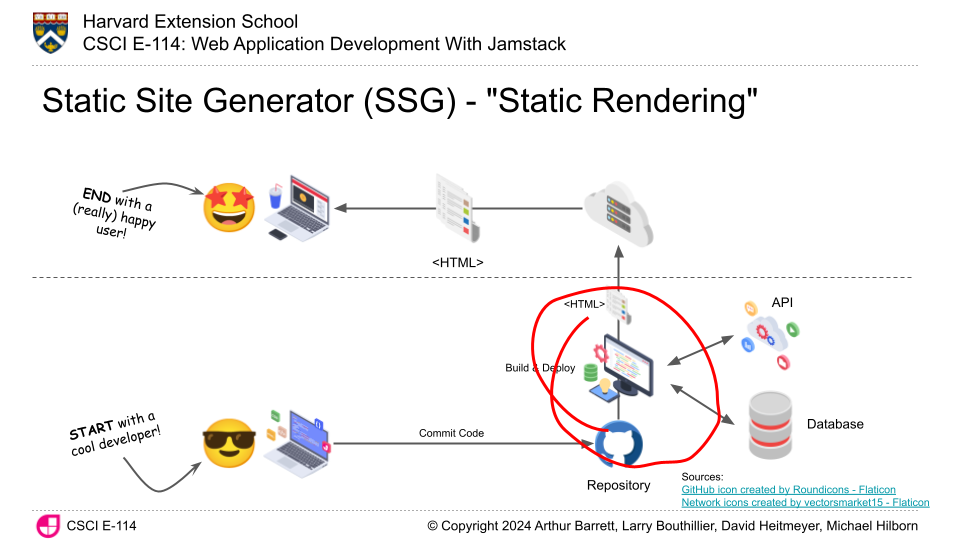
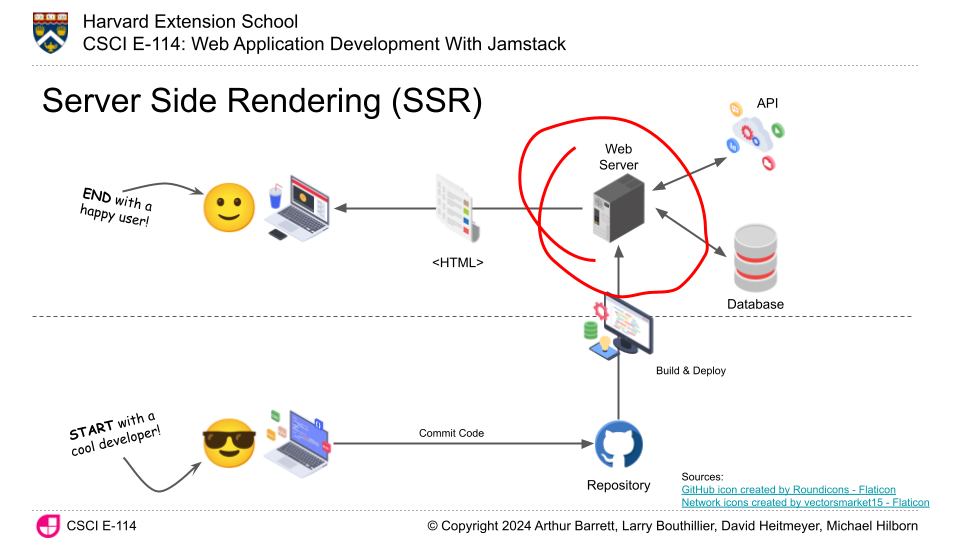
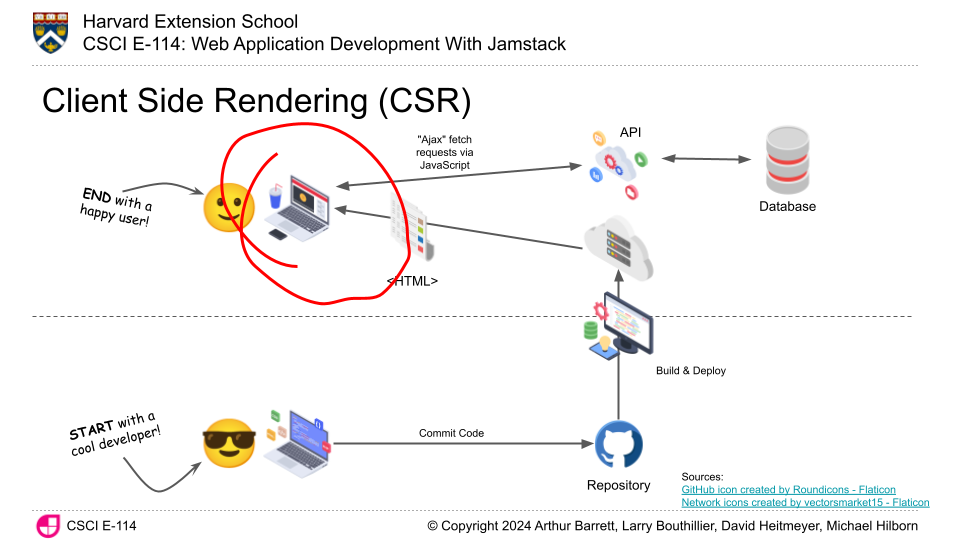
- SSG - Static Site Generation
Content is created programmatically at build time, and the static HTML content is served at time of request. - SSR - Server Side Rendering
Web server hands off HTTP request to a program, and the program generates the content - CSR - Client Side Rendering
e.g. JavaScript within web browser makes request for JSON data, then builds the page based on that data
SSG - Static Site Generation
SSR - Server Side Rendering
CSR - Client Side Rendering
Example of SSG
- 11ty (Eleventy): a simpler static site generator
- What is it?
- JavaScript based tool -- and specifically Node.js, which allows us to run JavaScript on the server or from the command line.
- Templates!
- Data
- Build system to generate site
- Can couple this with GitHub actions to automate deployments (e.g. commit to a branch in GitHub, site is built, tested, and copied to hosting server).
- Examples
SSR with Web CMS (Content Management Systems)
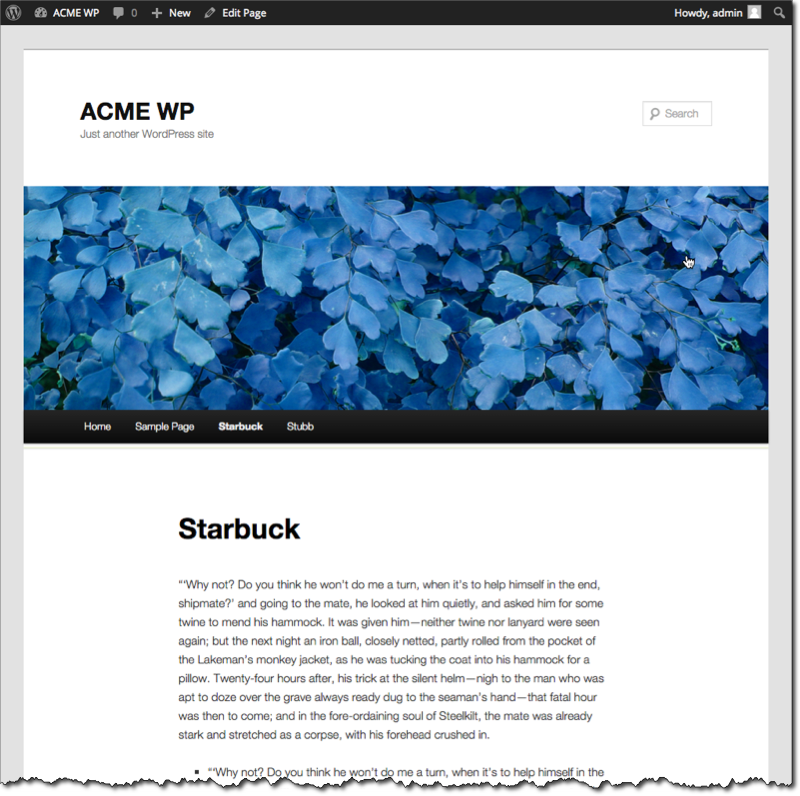
CMS aims to solve both "DRY" (Don't Repeat Yourself) as well as "easy editing" of sites through a browser.
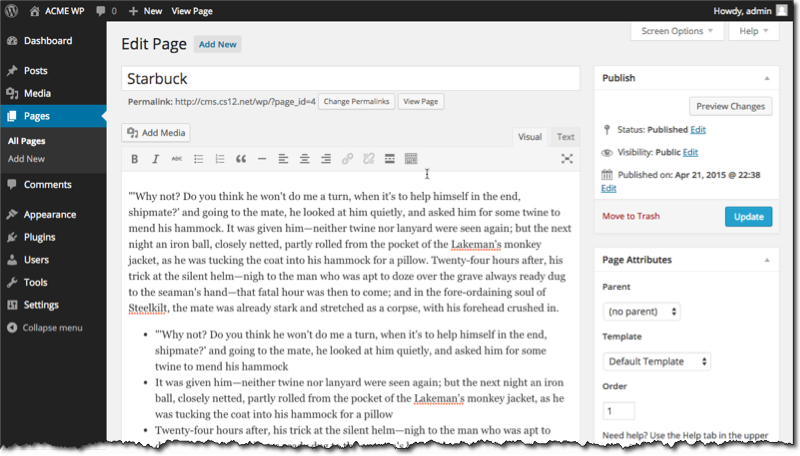
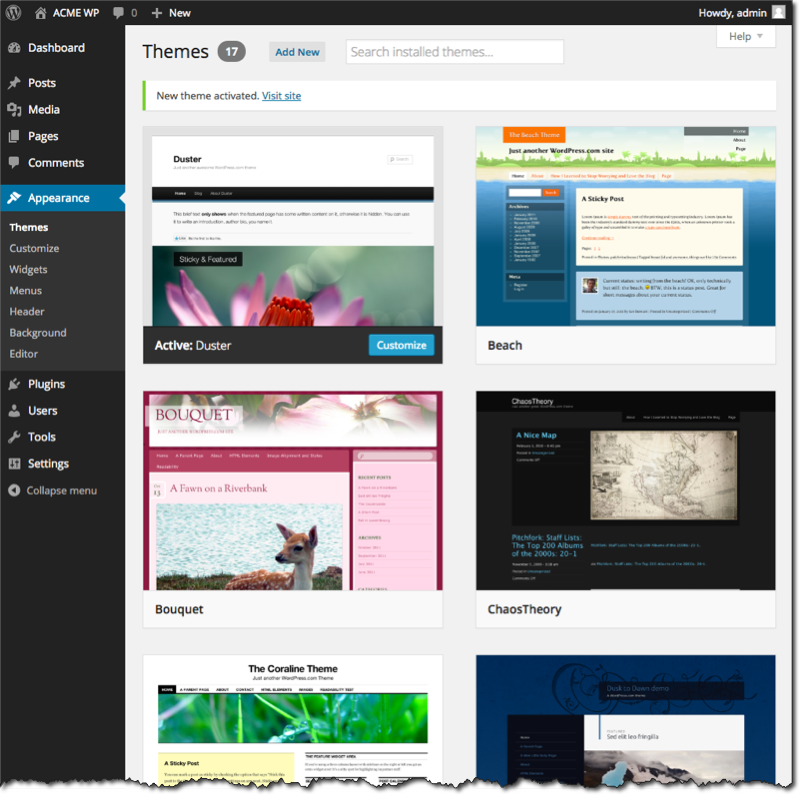
WordPress
Open source software which you can use to easily create a beautiful website, blog, or app.
Drupal
Drupal - the leading open-source CMS for ambitious digital experiences that reach your audience across multiple channels. Because we all have different needs, Drupal allows you to create a unique space in a world of cookie-cutter solutions.
Drupal is an open source platform for building amazing digital experiences. It's made by a dedicated community. Anyone can use it, and it will always be free.
"Back end" (Server-Side) Web Development
| Language | Frameworks/Platforms |
|---|---|
| JavaScript |
"Back-end": Node, Express "Front-end": React, Vue, Angular, Ember |
| PHP | Laravel, Symfony, CodeIgniter, CakePHP PHP-based CMS: WordPress, Drupal, Joomla |
| Python | Django, Flask, Zope, Plone |
| Go | Gin, Echo, Beego, etc. |
Server Side Rendering of Content (SSR)
Web Program Examples
Markup or content is embedded within a program; program embedded into markup
first.py - Python
#!/usr/bin/python3
print("Content-type: text/html\n\n")
print("<html><head><title>Hello World!</title></head>")
print("<body><h1>Hello, World!</h1></body></html>")
first.php - PHP
<?php
echo('<html><head><title>First PHP</title></head><body>');
echo('<h1>Hello!</h1>');
echo('</body></html>');
?>
second.php - PHP
second.php
program statements within markup
<?php
      $title = "Hello World!";
?>
<!DOCTYPE html>
  <head>
    <meta charset="utf-8" />
    <title><?php echo($title) ?></title>
  </head>
  <body>
    <h1><?php echo($title) ?></h1>
  </body>
</html>
A Personal Greeting
<?php
      $name = $_GET["name"];
?>
<!DOCTYPE html>
<html>
  <head>
    <meta charset="utf-8" />
    <title>Greeting Page</title>
  </head>
  <body>
    <h1>Hello, <?php echo($name) ?>!</h1>
  </body>
</html>
A Personal Greeting
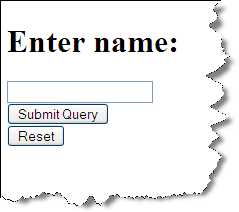
Without a "name", present the user a form. With a name, provide a greeting.






<?php
      $name = $_GET["name"];
?>
<!DOCTYPE html>
<html>
  <head>
    <meta charset="utf-8"/>
    <title>Greeting Page</title>
  </head>
  <body>
    <?php
    if ($name) {
      echo("<h1>Hello, $name!</h1>");
    } else {
      echo('<h1><label for="input_name">Enter name:</label></h1>');
      echo('<form method="get">');
      echo('<input type="text" name="name" id="input_name"/>');
      echo('<br /><input type="submit" />');
      echo('<br /><input type="reset" />');
    }
?>
  </body>
</html>
PHP Example with Courses Database

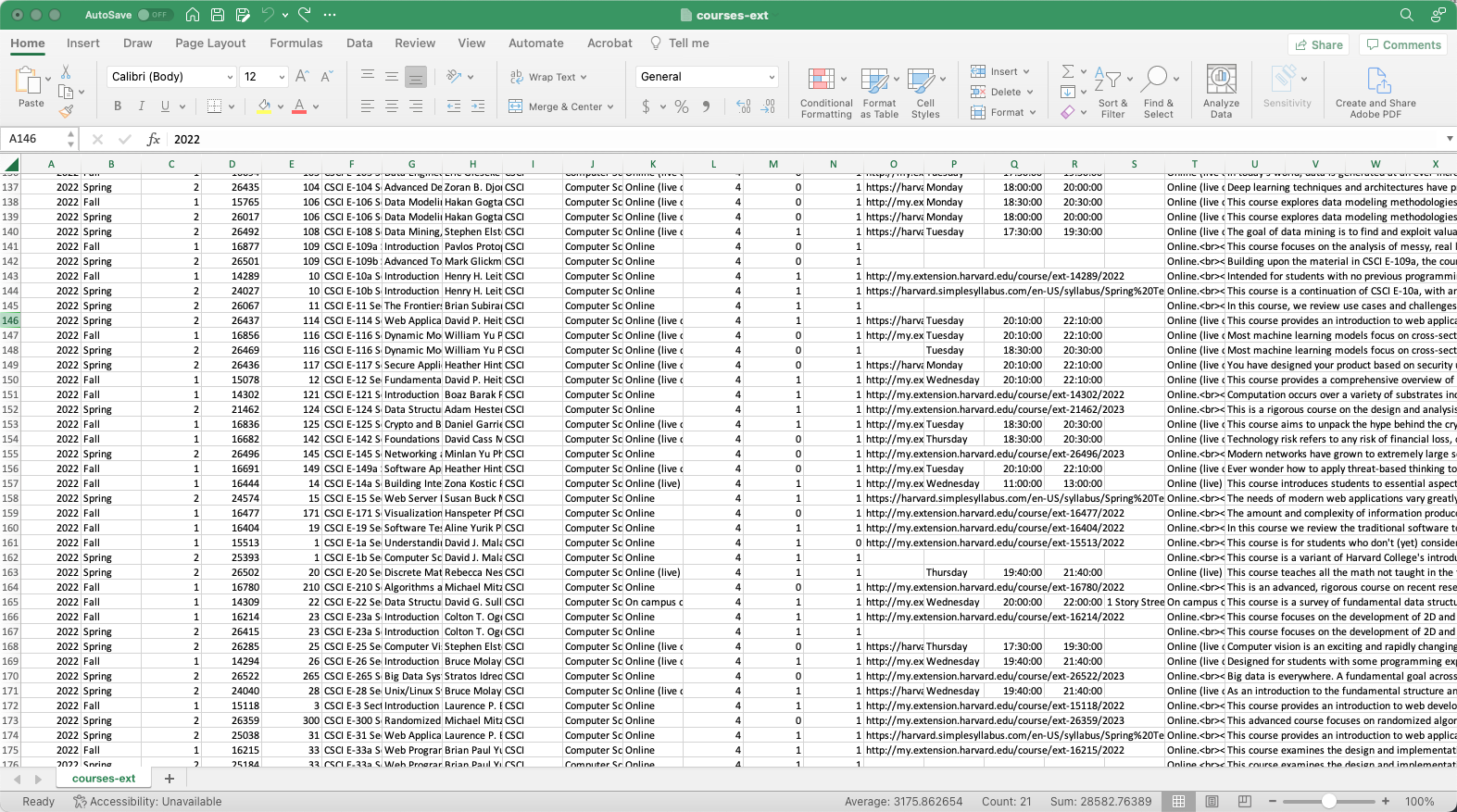
Harvard Extension Course Data
Course Data in a Spreadsheet
Data Table in a Relational Database
RDBMS = Relational Database Management System
- Postgres
- MySQL
- Oracle
- Microsoft SQL Server
Course Data in RDBMS Table
Course data for Faculty of Arts & Sciences is in a mysql database on cscie12students (username: class; database name: coursecatalog)
SQL:
describe ext_coursesTerminal:
cscie12students$ mysql -u class coursecatalog
Welcome to the MySQL monitor.  Commands end with ; or \g.

mysql> describe ext_courses;
+----------------------+--------------+------+-----+---------+-------+
| Field                | Type         | Null | Key | Default | Extra |
+----------------------+--------------+------+-----+---------+-------+
| academic_year        | year         | YES  |     | NULL    |       |
| term                 | varchar(32)  | YES  |     | NULL    |       |
| term_code            | int          | YES  |     | NULL    |       |
| course_code          | int          | YES  |     | NULL    |       |
| course_number        | int          | YES  |     | NULL    |       |
| short_title          | text         | YES  |     | NULL    |       |
| title                | text         | YES  |     | NULL    |       |
| faculty_description  | text         | YES  |     | NULL    |       |
| department_code      | varchar(15)  | YES  |     | NULL    |       |
| department           | varchar(200) | YES  |     | NULL    |       |
| course_type          | varchar(100) | YES  |     | NULL    |       |
| credits              | varchar(50)  | YES  |     | NULL    |       |
| credit_undergraduate | int          | YES  |     | NULL    |       |
| credit_graduate      | int          | YES  |     | NULL    |       |
| url                  | varchar(300) | YES  |     | NULL    |       |
| days_of_week         | varchar(100) | YES  |     | NULL    |       |
| start_time           | varchar(15)  | YES  |     | NULL    |       |
| end_time             | varchar(15)  | YES  |     | NULL    |       |
| location             | varchar(64)  | YES  |     | NULL    |       |
| notes                | text         | YES  |     | NULL    |       |
| description          | text         | YES  |     | NULL    |       |
+----------------------+--------------+------+-----+---------+-------+
21 rows in set (0.00 sec)
Selecting List of Departments
SQL Input:
select DISTINCT department_code, department from ext_coursesTerminal Output:
mysql> SELECT DISTINCT department_code, department FROM ext_courses ORDER BY department;
+-----------------+--------------------------------------+
| department_code | department                           |
+-----------------+--------------------------------------+
| AAAS            | African and African American Studies |
| ANTH            | Anthropology and Archaeology         |
| APMA            | Applied Mathematics                  |
| ARAB            | Arabic                               |
| ASTR            | Astronomy                            |
| BIOS            | Biological Sciences                  |
| BIOT            | Biotechnology                        |
| CELT            | Celtic Languages and Literatures     |
| CHEM            | Chemistry                            |
| CLAS            | Classics                             |
| CSCI            | Computer Science                     |
| CREA            | Creative Writing                     |
| DEVP            | Development Practice                 |
| DGMD            | Digital Media                        |
| DRAM            | Dramatic Arts                        |
| ECON            | Economics                            |
| EDUC            | Education                            |
| ENSC            | Engineering Sciences                 |
| ENGL            | English                              |
| ENVR            | Environmental Studies                |
| EXPO            | Expository Writing                   |
| FREN            | French Language and Literature       |
| GERM            | German                               |
| GOVT            | Government                           |
| CGRK            | Greek                                |
| HIST            | History                              |
| HARC            | History of Art and Architecture      |
| HUMA            | Humanities                           |
| IORP            | Industrial-Organizational Psychology |
| ISMT            | Information Systems Management       |
| ITAL            | Italian                              |
| JAPA            | Japanese                             |
| JOUR            | Journalism                           |
| LATI            | Latin                                |
| LSTU            | Legal Studies                        |
| MGMT            | Management                           |
| MATH            | Mathematics                          |
| MUSE            | Museum Studies                       |
| MUSI            | Music                                |
| NUTR            | Nutrition                            |
| PHIL            | Philosophy                           |
| PHYS            | Physics                              |
| PSYC            | Psychology                           |
| RELI            | Religion                             |
| SSCI            | Social Sciences                      |
| SOCI            | Sociology                            |
| SPAN            | Spanish Language and Literature      |
| SPCH            | Speech                               |
| STAT            | Statistics                           |
| STAR            | Studio Arts and Film                 |
+-----------------+--------------------------------------+
50 rows in set (0.01 sec)
PHP Script to Connect to Database and Get List of Departments
<?php

// set header for text content
header('Content-type: text/plain');

// use Dotenv to load database info from .env file
// DB_HOST, DB_USER, DB_PW, DB_NAME
require_once('vendor/autoload.php');
$dotenv = Dotenv\Dotenv::createImmutable(__DIR__);
$dotenv->safeLoad();

// Connecting, selecting database
$mysqli = new mysqli($_ENV['DB_HOST'],$_ENV['DB_USER'],$_ENV['DB_PW'],$_ENV['DB_NAME']);
if ($mysqli->connect_errno) {
    echo "Failed to connect to mysql: ".$mysqli->connect_errno." ".$mysqli->connect_error;
}

// Performing SQL query
$query = 'SELECT DISTINCT department, department_code FROM ext_courses ORDER BY department';
$result = $mysqli->query($query);

// iterating through results
while ($row = $result->fetch_assoc()){
  echo $row['department_code'];
  echo "\t";
  echo $row['department'];
  echo "\n";
}
?>
Output
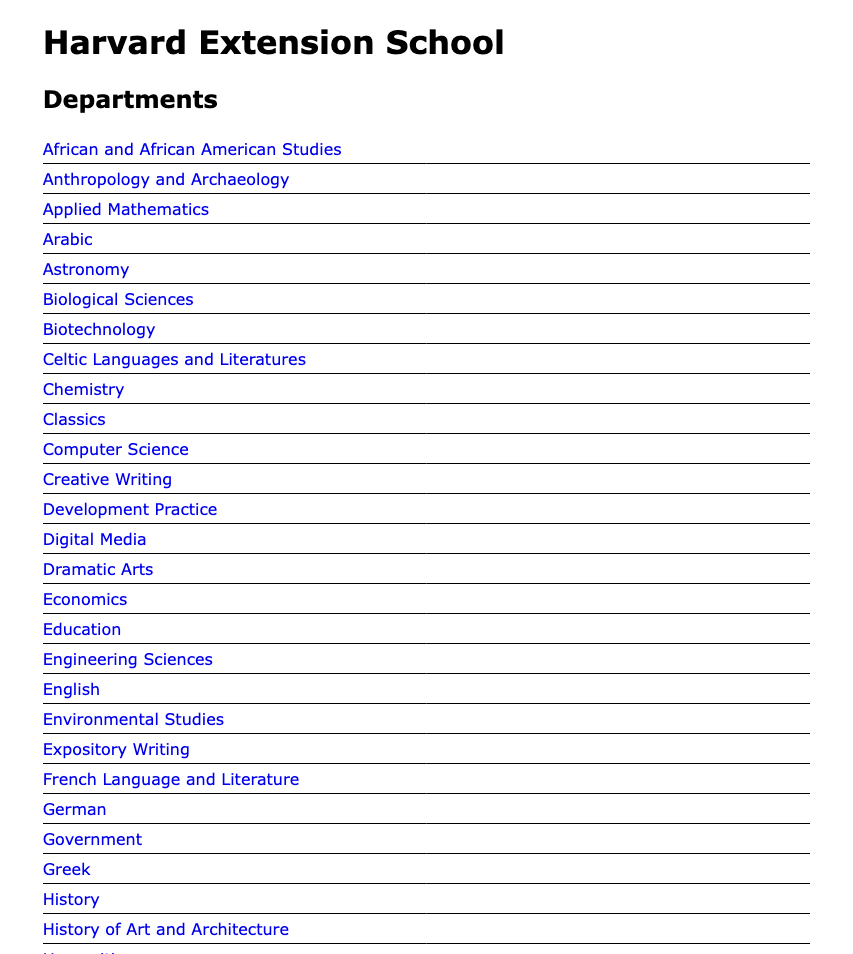
Turn this into HTML Output
<?php
// use Dotenv to load database info from .env file
// DB_HOST, DB_USER, DB_PW,     DB_NAME
// host,    user,    password,  database name
require_once('vendor/autoload.php');
$dotenv = Dotenv\Dotenv::createImmutable(__DIR__);
$dotenv->safeLoad();

// Connecting, selecting database
$mysqli = new mysqli($_ENV['DB_HOST'],$_ENV['DB_USER'],$_ENV['DB_PW'],$_ENV['DB_NAME']);
if ($mysqli->connect_errno) {
    echo "Failed to connect to mysql: ".$mysqli->connect_errno." ".$mysqli->connect_error;
}

// Performing SQL query
$query = <<<ENDQUERY
SELECT
    DISTINCT department, department_code
FROM
    ext_courses
ORDER BY
    department
ENDQUERY;

$result = $mysqli->query($query);

// iterating through results
echo "<ul>\n";
while ($row = $result->fetch_assoc()) {
  echo "<li>";
    echo $row['department'];
    echo "</li>\n";
 }
echo "</ul>\n";

// cleanup query result and close connection
$query_result->free();
$mysqli->close();
?>
The entire "departments-simple.php"
<!DOCTYPE html>
<html>
 <head>
  <title>Departments</title>
  <link rel="stylesheet" href="styles/site.css" />
 </head>
 <body>
<h1>Harvard Extension School</h1>
<h2>Departments</h2>

<?php
// use Dotenv to load database info from .env file
// DB_HOST, DB_USER, DB_PW, DB_NAME
require_once('vendor/autoload.php');
$dotenv = Dotenv\Dotenv::createImmutable(__DIR__);
$dotenv->safeLoad();

// Connecting, selecting database
$mysqli = new mysqli($_ENV['DB_HOST'],$_ENV['DB_USER'],$_ENV['DB_PW'],$_ENV['DB_NAME']);
if ($mysqli->connect_errno) {
    echo "Failed to connect to mysql: ".$mysqli->connect_errno." ".$mysqli->connect_error;
}

// Performing SQL query
$query = <<<ENDQUERY
SELECT
    DISTINCT department, department_code
FROM
    ext_courses
ORDER BY
    department
ENDQUERY;

$result = $mysqli->query($query);

// iterating through results
echo "<ul>\n";
while ($row = $result->fetch_assoc()) {
  echo "<li>";
    echo $row['department'];
    echo "</li>\n";
 }
echo "</ul>\n";

// cleanup query result and close connection
$query_result->free();
$mysqli->close();
?>

<footer>
  <p>This is a learning example to demonstrate PHP and mysql for the courses CSCI E-12 and CSCI S-12 taught by David Heitmeyer.  <br/>
The real <a href="https://courses.dce.harvard.edu/">Harvard Extension School course search</a> is at: <a href="https://courses.dce.harvard.edu/">courses.dce.harvard.edu</a></p>
</footer>
 </body>
</html>
Adding another view - Department Course Listings
Create another PHP file that displays course information based upon a department_code parameter.
courses.php- take a "department_code" parameter and produce alist of courses for that department.
Need to link to to courses.php:
Modify the department listing to include the hyperlink:
// Printing results in HTML
echo "<ul>\n";
while ($row = $result->fetch_assoc()) {
  echo "<li>";
  echo "<a href=\"courses.php?department_code=$row[department_code]\">"
  echo "$row[department]"
  echo "</a>";
  echo "</li>\n";
}
echo "</ul>\n";
courses.php
<!DOCTYPE html>
<html>
 <head>
  <meta charset="UTF-8"/>
  <title>Harvard Extension Courses</title>
  <link rel="stylesheet" href="styles/site.css" type="text/css"/>
 </head>
 <body>
<h1>Harvard Extension Courses</h1>
<p><a href="departments.php">Return to Department List</a></p>
<?php

// use Dotenv to load database info from .env file
// DB_HOST, DB_USER, DB_PW,     DB_NAME
// host,    user,    password,  database name
require_once('vendor/autoload.php');
$dotenv = Dotenv\Dotenv::createImmutable(__DIR__);
$dotenv->safeLoad();

// Connecting, selecting database
$mysqli = new mysqli($_ENV['DB_HOST'],$_ENV['DB_USER'],$_ENV['DB_PW'],$_ENV['DB_NAME']);
if ($mysqli->connect_errno) {
    echo "Failed to connect to mysql: ".$mysqli->connect_errno." ".$mysqli->connect_error;
}

$dept_code = $_GET['department_code'];
$sqlescaped_dept_code = $mysqli->real_escape_string($dept_code);
$dept_code_html = htmlentities($dept_code);
?>
<h2>Department - <?php echo $dept_code_html ?></h2>
<?php
// Performing SQL query
$query = <<<ENDQUERY
SELECT
  department,
  department_code,
  course_number,
  term,
  academic_year,
  short_title,
  title,
  description,
  faculty_description
FROM
  ext_courses
WHERE
  department_code = '$sqlescaped_dept_code'
ORDER BY
  department,
  course_number,
  title
ENDQUERY;

$result = $mysqli->query($query);

// Printing results in HTML

$i = 0;
while ($row = $result->fetch_assoc()) {
  // calculate year
  $academic_year_display = $row['academic_year'];
  if ($row['term'] == 'Spring' or $row['term'] == 'January') {
    $academic_year_display += 1 ;
  }

  $course_content = <<<ENDCONTENT
  <section class="course">
  <h2 class="abbrev"> $row[short_title] </h2>
  <div>
    <p class="term">$row[term] $academic_year_display</p>
    <p class="title"><strong>$row[title]</strong></p>
    <p class="faculty">$row[faculty_description]</p>
    <p class="description">$row[description]</p>
  </div>
  </section>
ENDCONTENT;
  echo($course_content);
}


// cleanup query result and close connection
$query_result->free();
$mysqli->close();
?>
<footer>
<p><a href="./">PHP/mysql example list</a></p>
    <p>This is a learning example to demonstrate PHP and mysql for the courses CSCI E-12 and CSCI S-12 taught by David Heitmeyer.  <br/>
  The real <a href="https://courses.dce.harvard.edu/">Harvard Extension School course search</a> is at: <a href="https://courses.dce.harvard.edu/">courses.dce.harvard.edu</a>
    </p>
</footer>
</body>
</html>
Separation of Concerns
Separate the data the view using templates!
- PHP code connects to database and does query and gets the data
- Define how to display that data with a template (generic term, not referring to
<template>element) -- and in this case, we'll use Mustache templates! Handlebars syntax is compatible with Mustache!
Note that Twig is a popular template system to use with PHP.
And note that there are many other template systems, including Liquid.
{{Mustache}} Templates
{{mustache}} is another widely used template system for JavaScript (and other languages!).
Mustache Departments
Mustache Template
PHP
<?php

  // use Dotenv to load database info from .env file
  // DB_HOST, DB_USER, DB_PW,     DB_NAME
  // host,    user,    password,  database name
  require_once('vendor/autoload.php');
  $dotenv = Dotenv\Dotenv::createImmutable(__DIR__);
  $dotenv->safeLoad();

  // Connecting, selecting database
  $mysqli = new mysqli($_ENV['DB_HOST'],$_ENV['DB_USER'],$_ENV['DB_PW'],$_ENV['DB_NAME']);
  if ($mysqli->connect_errno) {
      echo "Failed to connect to mysql: ".$mysqli->connect_errno." ".$mysqli->connect_error;
  }

  // Performing SQL query
  $query = <<<ENDQUERY
  SELECT DISTINCT
         department,
         department_code
  FROM ext_courses
  ORDER BY department
  ENDQUERY;

  $result = $mysqli->query($query);
  $rows = $result->fetch_all(MYSQLI_ASSOC);

  $template_data['departments'] = $rows;

// Process with Mustache Template
include('lib/Mustache.php');

$m = new Mustache;
$template_file = 'mustache_templates/departments.html';
$template_contents = file_get_contents($template_file);
echo $m->render($template_contents, $template_data);

// cleanup query result and close connection
$mysqli->close();
?>
Mustache Template
mustache_templates/departments.html
<!DOCTYPE html>
<html>

<head>
  <meta charset="UTF-8" />
  <title>Harvard Extension School - Departments</title>
  <link rel="stylesheet" href="styles/site.css" />
</head>

<body>
  <h1>Harvard Extension School</h1>
  <h2>Departments</h2>
  <ul>
    {{#departments}}
    <li>
      <a href="mustache-courses.php?department_code={{department_code}}">{{department}}</a>
    </li>
    {{/departments}}
  </ul>

  <footer>
    <p><a href="./">PHP/mysql example list</a></p>
    <p>This is a learning example to demonstrate PHP and mysql for the courses CSCI E-12 and CSCI S-12 taught by David
      Heitmeyer. <br />
      The real <a href="https://courses.dce.harvard.edu/">Harvard Extension School course search</a> is at: <a
        href="https://courses.dce.harvard.edu/">courses.dce.harvard.edu</a>
    </p>
  </footer>
</body>

</html>
Mustache Courses
<!DOCTYPE html>
<html lang="en">

<head>
  <title>Harvard Extension Courses in {{ department_name }}</title>
  <link rel="stylesheet" href="styles/site.css" />
  <meta charset="UTF-8" />
</head>

<body>
  <h1>Harvard Extension Courses in {{ department_name }}</h1>
  <p><a href="mustache-dept.php">Return to Department List</a></p>
  <h2>{{department_name}}</h2>
  <div>
    {{#courses}}
    <section class="course">
      <h2 class="abbrev">{{ short_title }}</h2>
      <div>
        <p class="term">{{ term }} {{ academic_year_display }}</p>
        <p class="title">{{ title }}</p>
        <p class="faculty">{{ faculty_description }}</p>
        <p class="description">{{{ description }}}</p>
      </div>
      </section>
    {{/courses}}
  </div>

  <footer>
    <p><a href="./">PHP/mysql example list</a></p>
    <p>This is a learning example to demonstrate PHP and mysql for the courses CSCI E-12 and CSCI S-12 taught by David
      Heitmeyer. <br />
      The real <a href="https://courses.dce.harvard.edu/">Harvard Extension School course search</a> is at: <a
        href="https://courses.dce.harvard.edu/">courses.dce.harvard.edu</a>
    </p>
  </footer>
</body>

</html>
Improving the Hello! Greeting
We started with
Without a "name", present the user a form. With a name, provide a greeting.
<?php
      $name = $_GET["name"];
?>
<!DOCTYPE html>
<html>
  <head>
    <meta charset="utf-8" />
    <title>Greeting Page</title>
  </head>
  <body>
    <?php
      if ($name) {
        echo("<h1>Hello, $name!</h1>");
      } else {
        echo('<h1><label for="input_name">Enter name:</label></h1>');
        echo('<form method="get">');
        echo('<input type="text" name="name" id="input_name"/>');
        echo('<br /><input type="submit" />');
        echo('<br /><input type="reset" />');
      }
    ?>
  </body>
</html>
Hello! Greeting, Improved
Three files: one code; two templates
- index.php
- greeting.html
- form.html
index.php
<?php
$name = $_GET["name"];

// figure out which template is needed
if ($name) {
  $template_file = 'greeting.html';
} else {
  $template_file = 'form.html';
}
$template_contents = file_get_contents($template_file);
$template_data['name'] = $name;

// Process with Mustache Template
include('lib/Mustache.php');
$m = new Mustache;

echo $m->render($template_contents, $template_data);

?>
greeting.html
<!DOCTYPE html>
<html>
  <head>
    <meta charset="utf-8" />
    <title>Greeting Page for {{name}}</title>
  </head>
  <body>
      <h1>Hello, {{name}}!</h1>
  </body>
</html>
form.html
<!DOCTYPE html>
<html>
  <head>
    <meta charset="utf-8" />
    <title>Greeting Page</title>
  </head>
  <body>
      <h1><label for="input_name">Enter name:</label></h1>
      <form method="get">
      <input type="text" name="name" id="input_name"/>
      <br /><input type="submit" />
      <br /><input type="reset" />
  </body>
</html>
Sending Email
Mail service -- e.g. Mailgun, Sendgrid, etc.
submit.php Example (uses Mailgun)
<?php require_once 'vendor/autoload.php';

     $loader = new \Twig\Loader\FilesystemLoader('./templates');
     $twig = new \Twig\Environment($loader, [
         'cache' => './compilation_cache',
         'debug' => true,
         'auto_reload' => true
     ]);
     $requestTime = new DateTime();
     $requestTime->setTimestamp($_SERVER['REQUEST_TIME']);
     $requestTimeHuman = $requestTime->format('Y-m-d\TH:i:s');

     $echocontent = $twig->render('form-response-template.html',
          [
          'getparams' => $_GET,
          'postparams' => $_POST,
          'httpheaders' => getallheaders(),
          'httpmethod' => $_SERVER['REQUEST_METHOD'],
          'serverinfo' => $_SERVER,
          'requesttime' => $requestTimeHuman,
          'httpreferer' => $_SERVER['HTTP_REFERER']
          ]);
     ?>


     <?php

     require 'vendor/autoload.php';
     use Mailgun\Mailgun;

     $mailto = filter_var($_POST['__mailto'], FILTER_VALIDATE_EMAIL);
     $mailkey = '';
     if (preg_match('/^csci(e|s)12\-(spring|summer|fall)-\d{4}-[a-z]+[0-9]+$/',$_POST['__mailkey'])) {
        $mailkey = $_POST['__mailkey'];
     }

     // only send if POST and if __mailto and if __mailkey exist

     if (strcmp($_SERVER['REQUEST_METHOD'],'POST') == 0 && $mailto && $mailkey ) {
       error_log("FormSubmit | MAILGUN | $mailkey | $mailto |");
       // First, instantiate the SDK with your API credentials
       $MG_API_KEY = getenv('MG_API_KEY');
       $MG_DOMAIN = getenv('MG_DOMAIN');
       $MG_ = getenv('MG_');

       $mg = Mailgun::create($MG_API_KEY); // For US servers
       $domain = $MG_DOMAIN;

       // Now, compose and send your message.
       // $mg->messages()->send($domain, $params);
       $mg->messages()->send($domain, [
         ''    => $MG_,
         'to'      => $mailto,
         'subject' => 'Form Submission',
         'html'    => $echocontent
       ]);
     }

     echo($echocontent);
     ?>
form_response_template.html
This is a PHP "Twig" template.
<DOCTYPE html>
     <html lang="en">
       <head>
        <title>Form Submission</title>
        <style><!-- inline styles removed for clarity --></style>
       </head>

       <body>
         <h1>Form Submission</h1>
         {% if getparams %}
         <h2>GET Parameters</h2>
         <table>
           <thead>
             <tr><th>Name</th><th>Value</th></tr>
           </thead>
           <tbody>
           {% for key, value in getparams %}
           <tr>
             <th>{{ key }}</th>
             <td>
               {% if value is iterable %}
               {% for v in value %}
                 {{ v }}{% if not(loop.last) %},<br/>{% endif %}
               {% endfor %}
               {% else %}
                 {{ value }}
               {% endif %}
             </td>
           </tr>
           {% endfor %}
           </tbody>
         </table>
         {% endif %}

         {% if postparams %}
         <h2>POST Parameters</h2>
         <table>
           <thead>
             <tr><th>Name</th><th>Value</th></tr>
           </thead>
           <tbody>
           {% for key, value in postparams %}
           <tr>
             <th>{{ key }}</th>
             <td>
               {% if value is iterable %}
               {% for v in value %}
                 {{ v }}{% if not(loop.last) %},<br/>{% endif %}
               {% endfor %}
               {% else %}
                 {{ value }}
               {% endif %}
             </td>
           </tr>
           {% endfor %}
           </tbody>
         </table>
         {% endif %}

         {% if serverinfo %}
         <h2>Request Information</h2>
         <table>
           <thead>
             <tr><th>Name</th><th>Value</th></tr>
           </thead>
           <tbody>
             <tr><th>Request Time</th><td>{{ requesttime }}</td></tr>
             <tr><th>Remote Address</th><td>{{ serverinfo['REMOTE_ADDR'] }}</td></tr>
             <tr><th>HTTP Referrer</th><td><a href="{{ httpreferer }}">{{ httpreferer }}</a></td></tr>
             <tr><th>HTTP Method</th><td>{{ httpmethod }}</td></tr>
           </tbody>
         </table>
         {% endif %}

         <footer>
           <p>This form submission tool is only for use by current students in <a href="https://cscie12.dce.harvard.edu/">CSCI E-12</a> and <a href="https://cscis12.dce.harvard.edu/">CSCI S-12</a> courses.</p><p>David Heitmeyer | <a href="https://extension.harvard.edu/">Harvard Extension School</a> | <a href="https://summer.harvard.edu/">Harvard Summer School</a></footer>
       </body>
      </html>
CSR (Client Side Rendering)
Front-end JavaScript + templates and Back-end JSON
Departments
- json-dept.php - PHP script that produces JSON
- departments.html - uses Handlebars
Courses
- json-courses.php?department_code=CHEM - PHP script that produces JSON
- courses.html?department_code=CHEM - uses Handlebars
Getting JSON from HTTP request
JavaScript functions are often asynchronous -- the script continues to run before a step has completed!
Javascript "fetch"
fetch(url).then(response => response.json()).then(data => processData(data));Let's Try It Out!
- Apples
- Courses
- National Park Service
Apples
You may find a "JSON Viewer" plugin or extension for your browser useful
if you work with JSON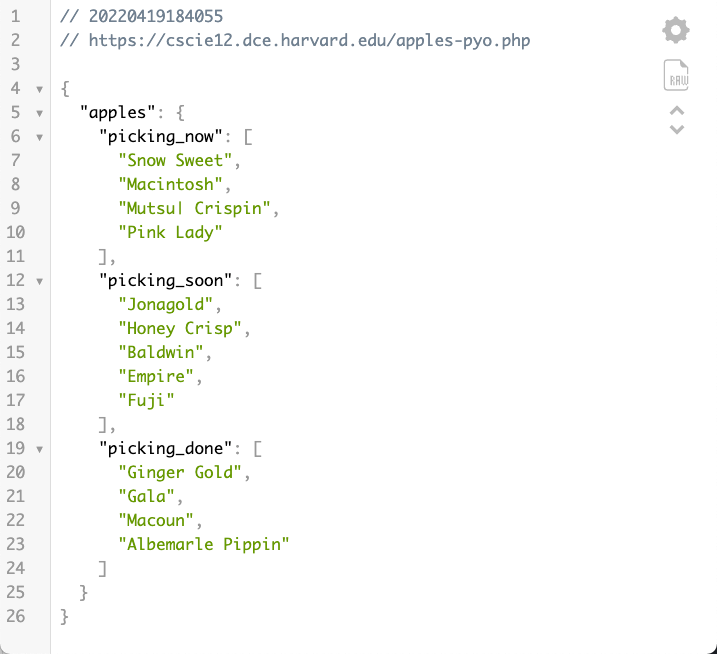
Apples
- apples-fetch.html
- JSON data apples-pyo.php
The JavaScript:
let applesUrl = "https://cscie12.dce.harvard.edu/apples-pyo.php";
  document.addEventListener('DOMContentLoaded',function(){
    fetch(applesUrl)
      .then(response => response.json())
      .then(data => buildApplesList(data));
  });

  function buildApplesList(data){
    let template = document.getElementById('apple-template').innerHTML ;
    console.log(template);
    let compiledTemplate = Handlebars.compile(template);
    let rendered = compiledTemplate(data);
    document.getElementById('applelist').innerHTML = rendered;
  }
The template:
<template id="apple-template">
  <h2>Picking Now</h2>
    <ul>
      {{#apples.picking_now}}
        <li>{{ . }}
      {{/apples.picking_now}}
    </ul>

    <h2>Picking Soon</h2>
    <ul>
      {{#apples.picking_soon}}
        <li>{{ . }}
      {{/apples.picking_soon}}
    </ul>
  </template>
JS and fetch
/* mlb api;  sportId = 1 is major league */
  let urlTeams = "https://statsapi.mlb.com/api/v1/teams?sportId=1";

  document.addEventListener("DOMContentLoaded", function () {
    fetch(urlTeams)
      .then(response => response.json())
      .then(data => buildList(data.teams));
  });
Courses — PHP and JSON data
Two problems to solve here:
- Producing JSON data on server side
- Processing JSON data on client-side
<?php

/// use Dotenv to load database info  .env file
// DB_HOST, DB_USER, DB_PW, DB_NAME
require_once('vendor/autoload.php');
$dotenv = Dotenv\Dotenv::createImmutable(__DIR__);
$dotenv->safeLoad();

// Connecting, selecting database
$mysqli = new mysqli($_ENV['DB_HOST'],$_ENV['DB_USER'],$_ENV['DB_PW'],$_ENV['DB_NAME']);
if ($mysqli->connect_errno) {
    echo "Failed to connect to mysql: ".$mysqli->connect_errno." ".$mysqli->connect_error;
}

$dept_code = $_GET['department_code'];
$sqlescaped_dept_code = $mysqli->real_escape_string($dept_code);

// Performing SQL query
$query = <<<ENDQUERY
SELECT
  department,
  department_code,
  course_number,
  term,
  academic_year,
  short_title,
  title,
  description,
  faculty_description

  ext_courses
WHERE
  department_code = '$sqlescaped_dept_code'
ORDER BY
  department,
  course_number,
  title
ENDQUERY;

$query_result = $mysqli->query($query);

$i = 0;
while ($row = $query_result->fetch_assoc()) {
  // calculate year
  $academic_year_display = $row['academic_year'];
  if ($row['term'] == 'Spring' or $row['term'] == 'January') {
    $academic_year_display += 1 ;
  }
  $row['academic_year_display'] = $academic_year_display;

  $results[$i++] = $row;
}

$template_data['courses'] = $results;
$template_data['department_name'] = $dept_code;

header('Content-type: application/json');
echo json_encode($template_data);

// cleanup query result and close connection
$query_result->free();
$mysqli->close();
?>
Front-end courses
For example: CSCI courses (courses.html?department_code=CSCI)
- Use JavaScript
fetchto get the JSON data - Use Handlebars to process the data
<!DOCTYPE html>
<html>

<head>
  <meta charset="utf-8" />
  <title>Departments</title>
  <link rel="stylesheet" href="styles/site.css" />
  <script src="https://cdnjs.cloudflare.com/ajax/libs/handlebars.js/4.7.7/handlebars.min.js"
    integrity="sha512-RNLkV3d+aLtfcpEyFG8jRbnWHxUqVZozacROI4J2F1sTaDqo1dPQYs01OMi1t1w9Y2FdbSCDSQ2ZVdAC8bzgAg=="
    crossorigin="anonymous"></script>

  <script>
    let dataUrl = './json-courses.php';
    let urlParams = new URLSearchParams(window.location.search);
    console.log(urlParams.get('department_code'));
    let department_code = urlParams.get('department_code');
    document.addEventListener('DOMContentLoaded', function () {
      fetch(dataUrl + '?department_code=' + department_code)
        .then(response => response.json())
        .then(data => {
          console.log(data);
          let mysource = document.getElementById('courses-list-template').innerHTML;
          let mytemplate = Handlebars.compile(mysource);
          let myresult = mytemplate(data)
          document.getElementById('courses-list').innerHTML = myresult;
        });
    });
  </script>

</head>

<body>
  <h1>Harvard Extension School</h1>
  <p><a href="departments.html">Return to Department List</a></p>

  <div id="courses-list">

  </div>

  <div id="courses-list-template" class="handlebars">
    <h2>{{ department_name }}</h2>
    <p>{{ courses.length }} courses</p>
    <div>
      {{#courses}}
      <section class="course">
        <h2 class="abbrev">{{ short_title }}</h2>
        <div>
          <p class="term">{{ term }} {{ academic_year_display }}</p>
          <p class="title">{{ title }}</p>
          <p class="faculty">{{ faculty_description }}</p>
          <p class="description">{{{ description }}}</p>
        </div>
      </section>
      {{/courses}}
    </div>

    <footer>
      <p><a href="./">PHP/mysql example list</a></p>
      <p>This is a learning example to demonstrate PHP and mysql for the courses CSCI E-12 and CSCI S-12 taught by David
        Heitmeyer. <br />
        The real <a href="https://courses.dce.harvard.edu/">Harvard Extension School course search</a> is at: <a
          href="https://courses.dce.harvard.edu/">courses.dce.harvard.edu</a>
      </p>
    </footer>

</body>

</html>