Approaching Your Final Project, and particularly the "Extraordinary Distinction"
Harvard Extension School
Fall 2024
Course Web Site: https://cscie12.dce.harvard.edu/
Topics
- Extraordinary Distinction - "Extras" for your site
- Search and Search Engine Optimization (SEO)
- Webpage and Website Optimization
- Hosting Your Site
- Apache HTTP Server
- Caching - Don't deliver content unnecessarily
- Minify and Compress Content
- Friendly Errors
- Friendly Ways to Get There
- Getting JSON from HTTP request
Presentation contains 41 slides





Extraordinary Distinction - "Extras" for your site
Work in one area that is beyond the "core" requirements of three pages implemented. This can be accomplished in a variety of ways, some of which are listed below.
Key point is to go deeper into an area or explore a new area entirely!
This will distinguish the final project from being more than just work from the assignments that are metaphorically stapled together.
Please identify in your report the work in this category!
The topics below also fit into the category of "things you should know about" coming out of a fundamentals course about website development. This is a good reason to dive into a topic that is of particular interest to you.
- Search Engine Optimization (SEO) and analytics. Pay attention to the various "meta" tags that may be useful for your site, including ones for Opengraph, Twitter, Schema.
- Page and Site Optimization. Analyze with Lighthouse (or Pagespeed or webpagetest.org) and implement improvements. Give us your starting point and report your scores/results after improvements.
- Using web server configurations, set appropriate caching directives and custom error documents. Host your site on a third party hosting service such as Dreamhost.
- Optimize design for multiple browser widths. Design with at least one breakpoint in mind, perhaps even two.
- Accessibility analysis. Start with WAVE tool (site or browser extension); interact with your page and site with only your keyboard; try another tool such as ARC Toolkit or Siteimprove.
- More in-depth with CSS or JS. Maybe you are going beyond the basics with your CSS or JavaScript -- let us know!
- More in-depth with wireframe or design tools. Maybe you want to go deeper with tools for design or for wireframes, such as Figma, Balsamiq, Sketch, , Miro, or a variety of the Adobe Creative Cloud products.
Search and Search Engine Optimization (SEO)
- Prepare
- Content: Valid markup (or at least well-formed!), semantic markup,
<title>, meta tags (CSS Tricks, focusing on social media), passes accessibility checks - Site: robots.txt, possibly a sitemap
- Content: Valid markup (or at least well-formed!), semantic markup,
- Submit your site
Content: meta tags
meta tags (CSS Tricks, focusing on social media) and Metadata Guidelines (W3 EOWG)
meta elements from Harvard University:
<title>Harvard University</title>
<meta name="description" content="Harvard University is devoted to excellence in teaching, learning, and research, and to developing leaders who make a difference globally." />
<link rel="canonical" href="https://www.harvard.edu/" />
<meta property="og:locale" content="en_US" />
<meta property="og:type" content="website" />
<meta property="og:title" content="Harvard University" />
<meta property="og:description" content="Harvard University is devoted to excellence in teaching, learning, and research, and to developing leaders who make a difference globally." />
<meta property="og:url" content="https://www.harvard.edu/" />
<meta property="og:site_name" content="Harvard University" />
<meta property="article:modified_time" content="2022-11-14T18:32:14+00:00" />
<meta property="og:image" content="https://www.harvard.edu/wp-content/uploads/2021/03/100408_Yard_045-1200x630.jpg" />
<meta property="og:image:width" content="1200" />
<meta property="og:image:height" content="630" />
<meta property="og:image:type" content="image/jpeg" />
<meta name="twitter:card" content="summary_large_image" />
<meta name="twitter:title" content="Harvard University" />
<meta name="twitter:description" content="Harvard University is devoted to excellence in teaching, learning, and research, and to developing leaders who make a difference globally." />
HTML5 Boilerplate - Louis Lazaris
A Basic HTML5 Template by Louis Lazaris
<!doctype html>

<html lang="en">
<head>
  <meta charset="utf-8">
  <meta name="viewport" content="width=device-width, initial-scale=1">

  <title>A Basic HTML5 Template</title>
  <meta name="description" content="A simple HTML5 Template for new projects.">
  <meta name="author" content="SitePoint">

  <meta property="og:title" content="A Basic HTML5 Template">
  <meta property="og:type" content="website">
  <meta property="og:url" content="https://www.sitepoint.com/a-basic-html5-template/">
  <meta property="og:description" content="A simple HTML5 Template for new projects.">
  <meta property="og:image" content="image.png">

  <link rel="icon" href="/favicon.ico">
  <link rel="icon" href="/favicon.svg" type="image/svg+xml">
  <link rel="apple-touch-icon" href="/apple-touch-icon.png">

  <link rel="stylesheet" href="css/styles.css?v=1.0">

</head>

<body>
  <!-- your content here... -->
  <script src="js/scripts.js"></script>
</body>
</html>
SEO - Start with...
- Good HTML
- A
<title>that is unique and stands on its own metadescription- Other
metatags- meta tags from CSS Tricks, focusing on social media
- A Basic HTML5 Template by Louis Lazaris
- Another boilerplate to learn from: html5boilerplate.com
Webpage and Website Optimization
- Lighthouse (part of browser developer tools)
- PageSpeed Insights
- WebPage Test
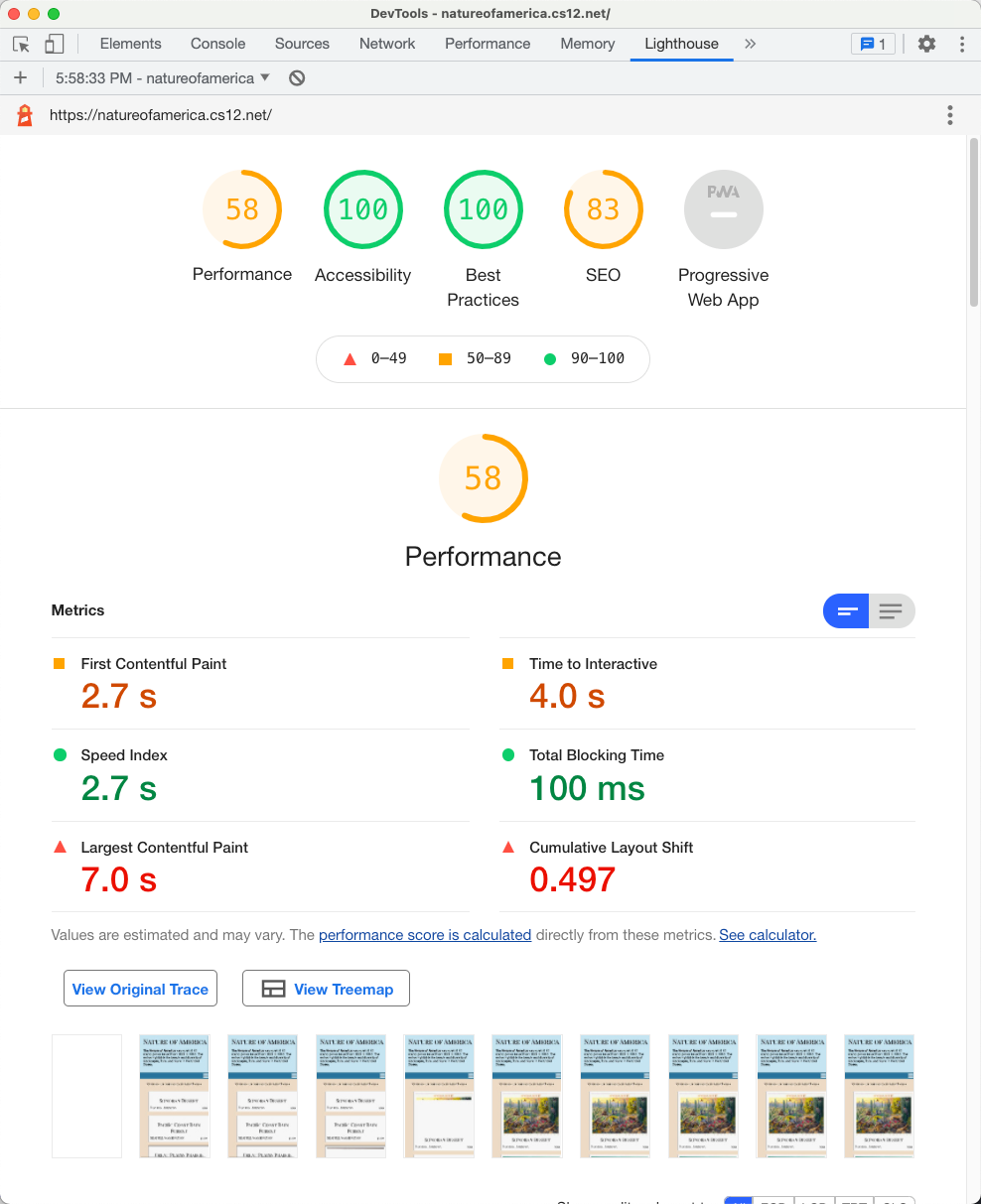
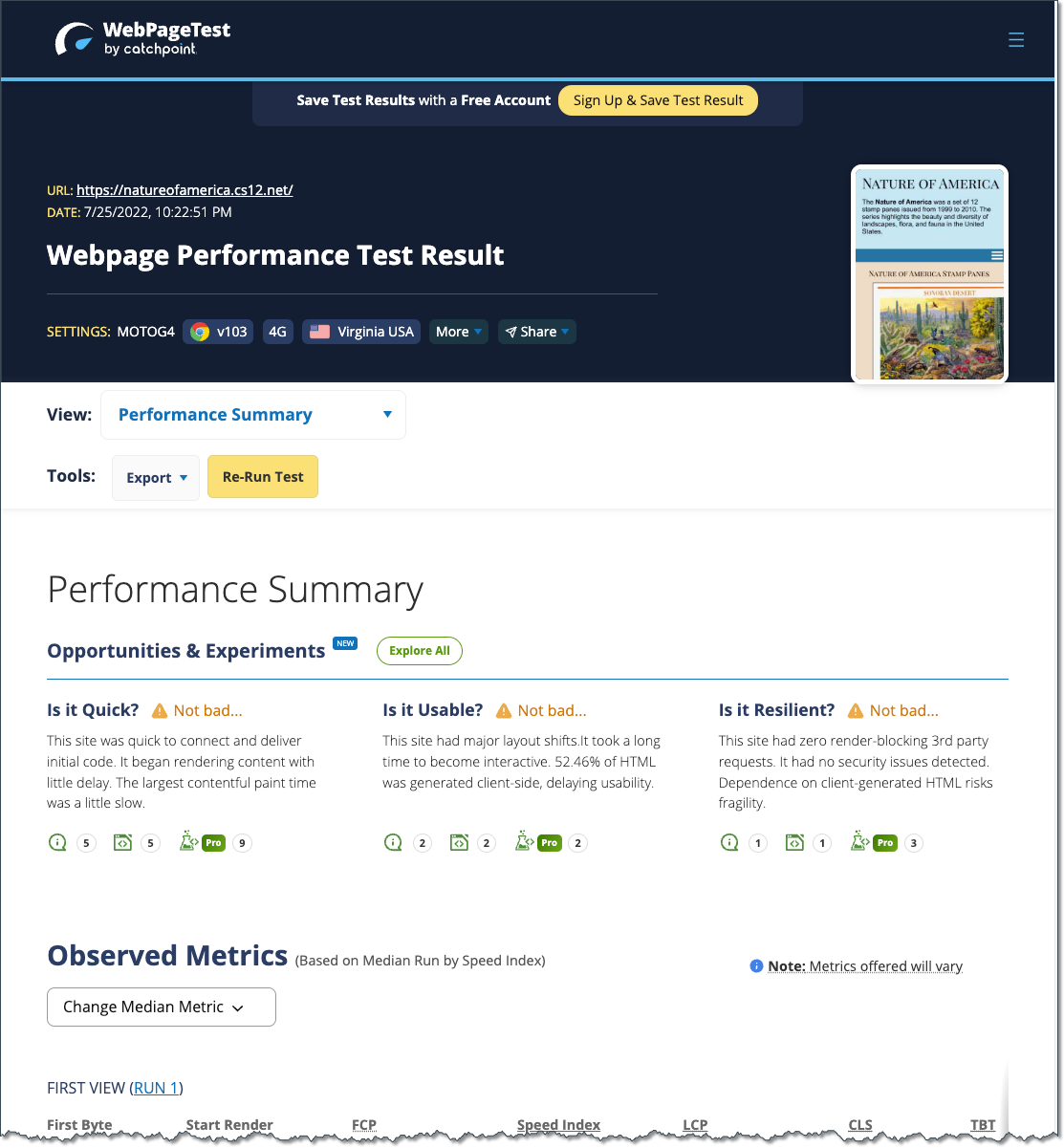
Core Web Vitals (CWV)
User-centered
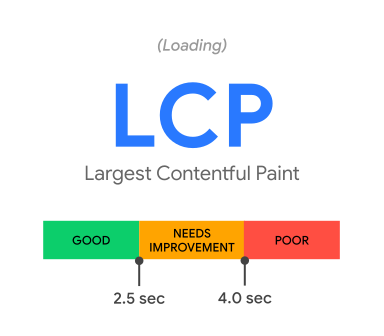
- Largest Contentful Paint (LCP): measures loading performance. To provide a good user experience, LCP should occur within 2.5 seconds of when the page first starts loading.
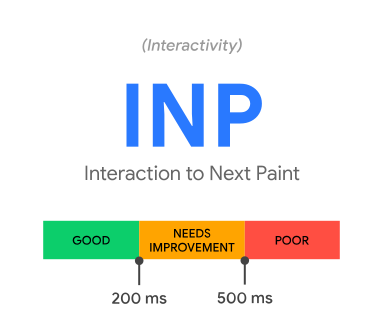
- Interaction to Next Paint (INP): measures interactivity. To provide a good user experience, pages should have a INP of 200 milliseconds or less.
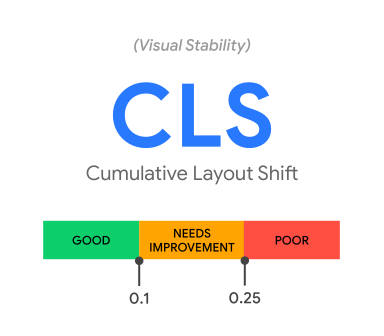
- Cumulative Layout Shift (CLS): measures visual stability. To provide a good user experience, pages should maintain a CLS of 0.1. or less.
Hosting Your Site
So, you want to graduate from the course web hosting server to your own domain? Yay!
It isn't hard, but there are some details....
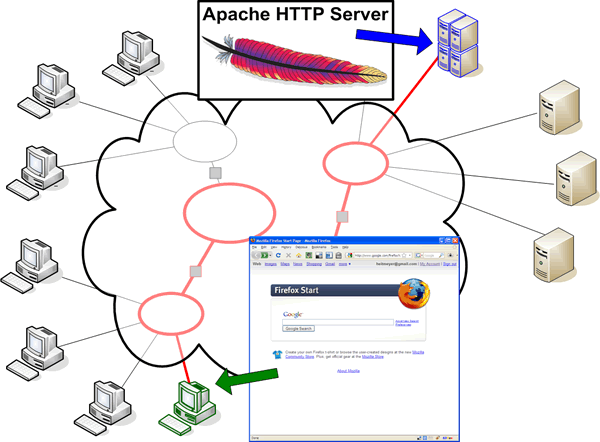
Web Browser and Web Server
Domain Name System
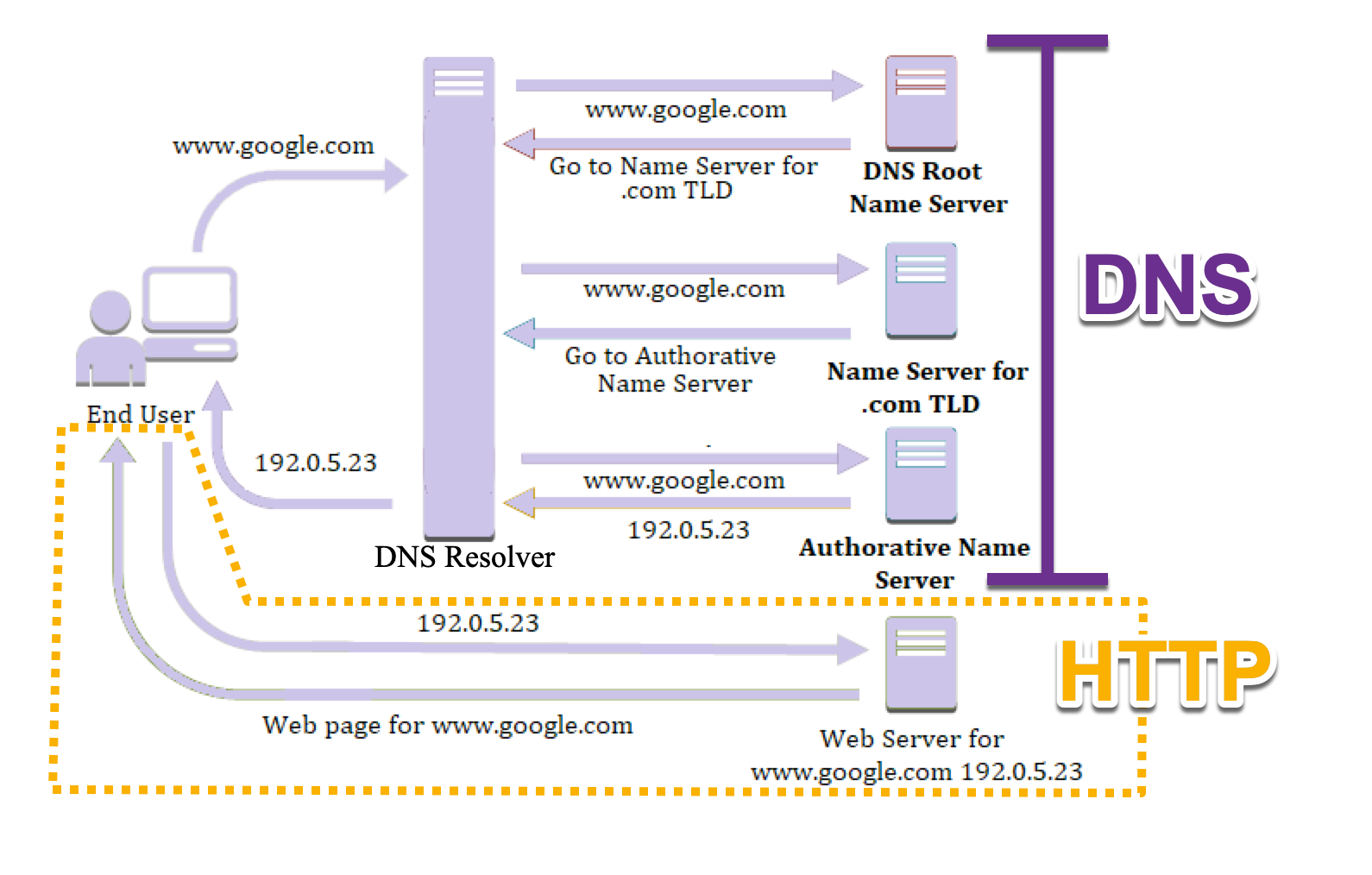
Computers connect by IP address (number); Humans like names (e.g. www.harvard.edu).
Domain Name System (DNS) resolves names to IP addresses (and the other way too)www.harvard.edu → 151.101.210.133
Domain Names: Top Level Domains (TLD)
TLDs are managed by the Internet Assigned Numbers Authority (IANA)
Generic: .com, .org, .edu, .gov, etc.
Country codes: .ch, .cn, .de, .uk, .us, etc.
Getting Your Own Domain and Hosting
Often Domain Name registration and Hosting will be setup together from the same company, but keep in mind that they are distinct and separate things!
- Domain Name
- Buy the domain through a "registrar"
- Provide name servers
- About $10/yr
- Hosting
- Shared ($7-15/mo)
- Private / Cloud
A very short list of hosting companies as a place to start.
My playground domain: cs12.net
I registered "cs12.net" and from there, I can control the subdomains from there. For example, natureofamerica.cs12.net, hello.cs12.net, wptest.cs12.net, etc.
Getting Setup with Dreamhost
- Domain
- Hosting Plan
- Recommendation: When setting up your site, do not choose WordPress!
This will give you a directory that you can SFTP to just like on the course web hosting server.
You will need the host, username, and password.
In addition, you can use a browser-based tool Dreamhost provides to upload files.
- Recommendation: When setting up your site, do not choose WordPress!
- You'll get a folder you can SFTP your files to, e.g.
mysite.com
Web Server Software
- Apache HTTP Server
- nginx
- "Other" - Microsoft, OpenResty, etc.
HyperText Transfer Protocol
GET
United States National Archives
www.archives.gov
HTTP/2 200
content-type: text/html; charset=utf-8
content-length: 24627
date: Wed, 16 Nov 2022 23:28:11 GMT
content-language: en
permissions-policy: interest-cohort=()
set-cookie: UUID=2e5ae12d-5a81-c5c4-49e7-8ffb91a120e9; expires=Thu, 16-Nov-2023 22:59:51 GMT; Max-Age=31536000; path=/; domain=.www.archives.gov; httponly
last-modified: Wed, 16 Nov 2022 22:59:51 GMT
strict-transport-security: max-age=31536000; includeSubDomains; preload
x-content-type-options: nosniff
etag: W/"1668639591-0-gzip"
v-ttl: 1899
cache-control: public, max-age=60, s-maxage=180
v-cache-ttl: 1899
x-frame-options: SAMEORIGIN
accept-ranges: bytes
vary: Cookie,Accept-Encoding
x-cache: Hit from cloudfront
via: 1.1 d5b8ff1568ca9900eb00feb643d95cd4.cloudfront.net (CloudFront)
x-amz-cf-pop: BOS50-P1
x-amz-cf-id: AAonOXKNDKqSml1g9p-sfF5H0zvxNSq1iypUW-fseaFZXdtns9IyAw==
age: 34

<!doctype html>
<html lang="en" dir="ltr" prefix="fb: //www.facebook.com/2008/fbml">
<head>
  <meta http-equiv="X-UA-Compatible" content="IE=edge">
  <meta name="viewport" content="width=device-width, initial-scale=1.0">  <!-- truncated for example -->
Looking at HTTP Under the Hood
Use your browser developer tools!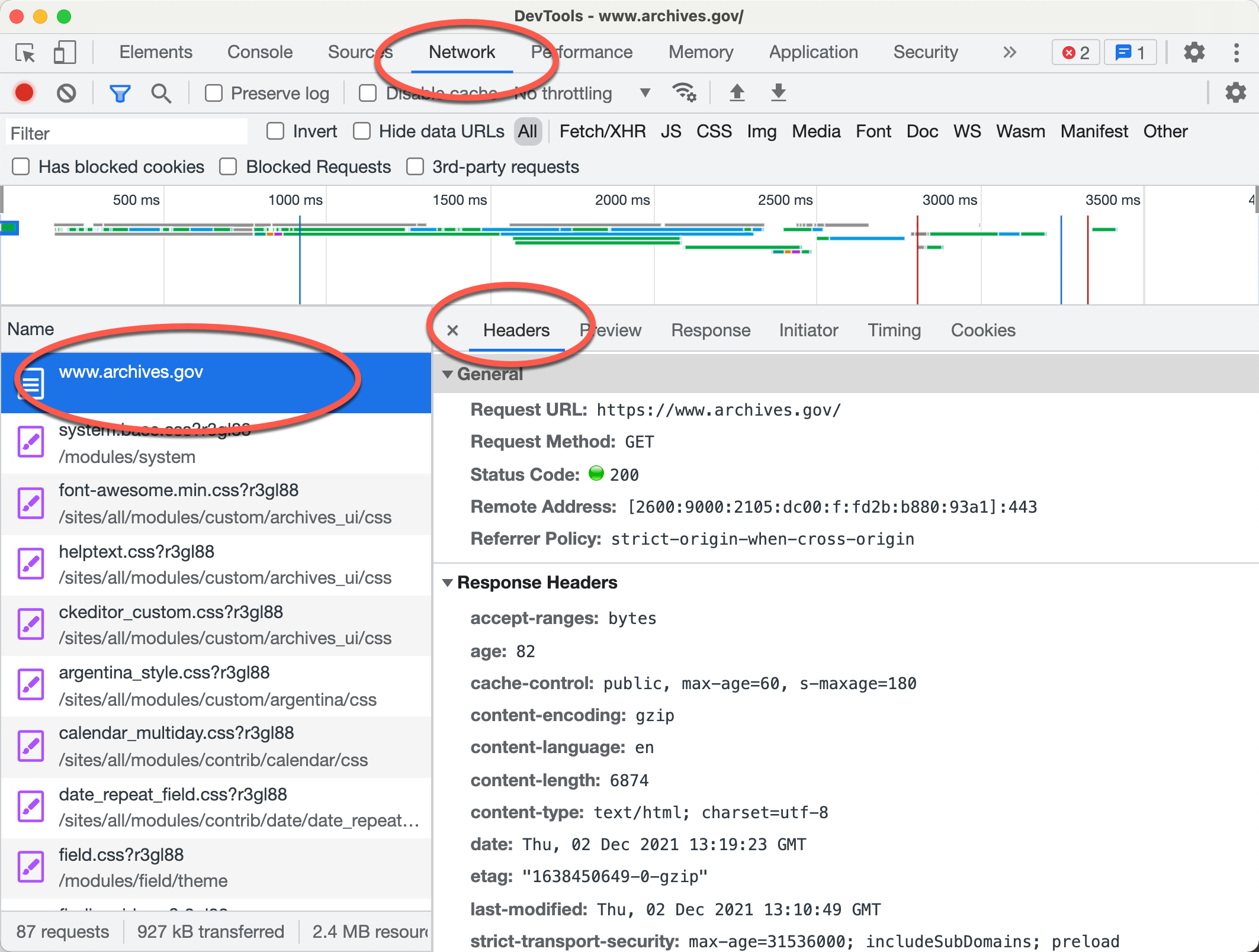
Apache HTTP Server

- Apache Software Foundation
- Apache HTTP Server Project
- Apache 2.x
- Apache Modules
- PHP
- Python
- many, many others
- Apache HTTP Server Project
Apache Configuration Overview
- Server Configuration
(
httpd.conf)
Unless you are the server administrator, you generally will not have access to this account. On the DCE systems, you do not have read or write access to this file. Server configuration is read at server start or restart. - Per Directory (
.htaccess)
Certain configuration directives for Apache can be placed within per-directory.htaccessfiles..htaccessfile is read on a per request basis.
Scope of .htaccess files
.htaccess files apply to the directory that
contains the .htaccess file and all its descendants.
Directives within the file,
/home/dh_xyz45/mycoolsite.com/.htaccess
would apply to all files within and "under" the mycoolsite.com directory for the user
dh_xyz45.
Directives within the file,
/home/dh_xyz45/mycoolsite.com/products/.htaccess
would apply to all files within and "under" the mycoolsite.com/products
directory for the user dh_xyz45.
Problems You Will Have with .htaccess files
- Internal Server Error
- Can't "see" the file
- Incorrect Permissions
500 Internal Server Error
500 Internal Server Error
:(
Problems You will encounter when using .htaccess files (Internal Server Error 500)
If you see begin seeing 500 Internal Server Error responses from the server after you have created or edited an
.htaccess file, the most
likely cause of the problem is incorrect permissions and/or an error in the directive
syntax.
- Permissions on the
.htaccessfile are not set correctly. Just like HTML and image files, the server must be able to read the.htaccessfile. The simplest way to allow that is to make your.htaccessfile readable by "other".
% pwd
/home/dh_xyz45/mycoolsite.com
% ls -l .htaccess
-rw-------   1 dh_xyz45  www         349 Nov 27 00:03 .htaccess
% chmod o+r .htaccess
% ls -l ~/mycoolsite.com/.htaccess
-rw----r--   1 dh_xyz45  www         349 Nov 27 00:03 .htaccess
- Syntax Error. An error in the syntax of a directive the
.htaccessfile will result in a 500 Internal Server Error. In addition, correct usage of a directive that is not allowed in the.htaccessfile will result in a 500 status code. Whether or not a directive is allowed depends upon the server configuration file (httpd.conf; AllowOverride) and the directive itself.
Problems You will encounter when using .htaccess files (Can't see the .htaccess file)
You can't "see" your .htaccess file.- HTTP
The web server is typically configured to deny requests for.htaccessfiles. - UNIX
Thelscommand will not list files or directories that begin with a '.' (dot). In order to see the.htaccessfile when you do a directory listing, use the -a (all) option: - SFTP
Sometimes your SFTP program will hide the "dot" files unless explicitly told to show them.
Caching - Don't deliver content unnecessarily
- Fewer HTTP requests to load pages
- Faster Load Times
- Less Bandwidth
Caching Related Headers
- Age
- Expires
- Last-Modified
- Cache-Control
- ETag
Expires HTTP Header
.htaccessExpiresActive On
ExpiresByType text/html A3600
# HTML expires in 1 hour
ExpiresByType image/gif A2592000
# GIF expires in 30 days
ExpiresByType image/jpeg A2592000
# JPEG expires in 30 days
ExpiresByType image/png A2592000
# PNG expires in 30 days
# types not specified
ExpiresDefault "now plus 1 day"
# expires in 1 day ExpiresActive On
ExpiresByType text/html M86400
# HTML expires 1 day after it was last modified
ExpiresDefault M86400 Do not cache
If you do not want your page cached, set these HTTP response headers:
Cache-control: no-cache
Pragma: no-cache
Expires: <set to now>
In .htaccess in Apache, this would translate to:
ExpiresDefault "now"
Header set Pragma "no-cache"
Typical Expiration / Cache Directives for Websites
Expire static content a week or more into the future.
In .htaccess
# Turn on the module.
ExpiresActive on
# Set the default expiry times.
ExpiresDefault "now"
ExpiresByType image/jpg "access plus 1 month"
ExpiresByType image/svg+xml "access 1 month"
ExpiresByType image/gif "access plus 1 month"
ExpiresByType image/jpeg "access plus 1 month"
ExpiresByType image/png "access plus 1 month"
ExpiresByType text/css "access plus 1 month"
ExpiresByType text/javascript "access plus 1 month"
ExpiresByType application/javascript "access plus 1 month"
ExpiresByType image/ico "access plus 1 month"
ExpiresByType text/html "access plus 600 seconds"
What about site updates?
Cache/Expiration based on full URL. So you can reflect the "version" within the URL, either as part of the path or part of the query string.
- Unique "version" content in query string
https://www[...]/site.min.css?ver=f1b2b77c823860edee8f0d253d01aaed
orhttps://www[...]/site.css?ver=20230701 - versioning as part of path
- Leaflet 1.9.4:
https://unpkg.com/leaflet@1.9.4/dist/leaflet.js - Leaflet 1.8.0:
https://unpkg.com/leaflet@1.8.0/dist/leaflet.js
- Leaflet 1.9.4:
Minify and Compress Content
- Fewer bytes == faster load time
- Happier Users
:) - Less Bandwidth
Minify Content
- VS Code Extensions for minify-ing JS and CSS
- Other tools (e.g. gulp, grunt) that might be part of running tasks of your development or publishing workflow.
Or even "bundler" tools (e.g. webpack, browserify)
Minified files can be 25% to 35% smaller!
Compress Content
mod_deflate compresses content before sending to web browser.
Simple use:
AddOutputFilterByType DEFLATE text/html
AddOutputFilterByType DEFLATE text/css
AddOutputFilterByType DEFLATE text/plain
AddOutputFilterByType DEFLATE text/xml
AddOutputFilterByType DEFLATE text/css
AddOutputFilterByType DEFLATE application/javascript
Does Compressing Help?
- 70 to 75% reduction for text files (markup, CSS, non-minified JS)
- 50% reduction even for 'minified' JS
This can make a noticable different in the total page weight!
Friendly Errors
Apache Default "Not Found" 404 document: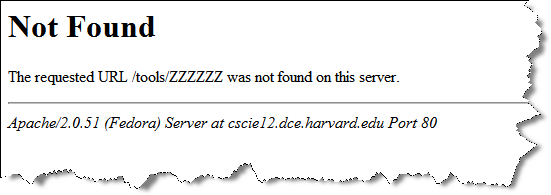
"Not Found" 404 for Harvard
"404" for my project site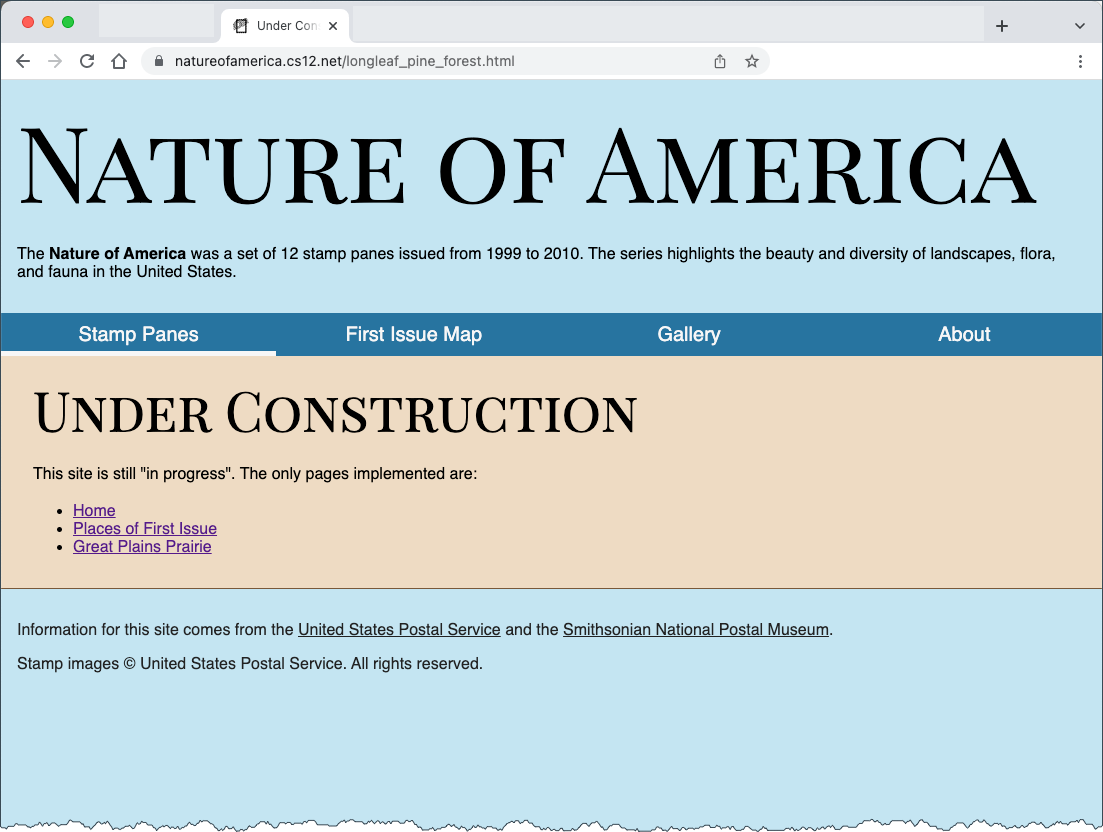
Custom Error Documents
.htaccessErrorDocument 401 /error/status401.html
ErrorDocument 403 /error/status403.html
ErrorDocument 404 /error/status404.html
ErrorDocument 500 /error/status500.html Another fine way to approach this would be for each of the different error status codes (401, 404, 404, 500) all point to a single error.html document.
ErrorDocument 401 /error.html
ErrorDocument 403 /error.html
ErrorDocument 404 /error.html
ErrorDocument 500 /error.html
Friendly Ways to Get There
- Short URLs
- Memorable URLs
- Don't break old URLs
HTTP Redirect
- Publish "clean" URLs, and redirect
- Site reorganization changes URL -- redirect old to new
Ways to Achieve this
- Redirect (Apache)
- Rewrite (Apache)
Redirecting Requests
301 Moved permanently
302 Moved temporarily
Redirecting client requests can be very useful:
- URL moves to a new location
- resource removed
- site structure is reorganized
- Provide "friendly" URLs to advertise, publish, or refer to foot-long URLs.
Redirect
For cscie12.dce.harvard.edu the .htaccess file[ contains:
RewriteRule ^/assignments https://canvas.harvard.edu/courses/132j062/assignments [R=302]
RewriteRule ^/syllabus$ https://canvas.harvard.edu/courses/132j062/assignments/syllabus  [R=302]
RewriteRule ^/schedule$ https://canvas.harvard.edu/courses/132j062/assignments/syllabus [R=302]
RewriteRule ^/textbooks /harvardcoop_textbooks.html [R=302]
RewriteRule ^/sshclients https://canvas.harvard.edu/courses/132j062/pages/ssh-clients-remote-login [R=302]
RewriteRule ^/sftpclients https://canvas.harvard.edu/courses/132j062/pages/file-transfer-sftp [R=302]
RewriteRule ^/sections https://canvas.harvard.edu/courses/132j062/pages/section-meetings-csci-e-12-15078 [R=302]Redirect 302 /syllabus    https://canvas.harvard.edu/courses/132j062/assignments/syllabus
Rewrite
mod_rewrite uses regular expressions to match on a pattern and rewrite incoming URLs to a new URL location.
Using mod_rewrite from within .htaccess
If you use RewriteRule from within an .htaccess files, you must
use the RewriteBase directive.
See: http://httpd.apache.org/docs/current/mod/mod_rewrite.html#rewritebase
Example - Make Simple Links Instead of Complex Ones
Context: Parks and Recreation class offered and how to easily link directly to the class
Park and Rec system:https://webtrac.littletonrec.com/wbwsc/webtrac.wsc/wbsearch.html
Link I can use with Rewrite rulehttp://littletontrack.org/lpr-303107
RewriteEngine On
RewriteBase /
RewriteRule ^lpr-(.*)$ https://webtrac.littletonrec.com/wbwsc/webtrac.wsc/wbsearch.html?per=10&xxsearch=yes&xxdispmap=no+&xxmulti-list=&xxmulti-lbls=&xxrowid=&xxmod=ar&xxactivitynumber=$1&xxage=&xxgrade=&xxkeyword=&xxkeywordoption=N&xxtype=&xxcategory=&xxsortoption=ActivityNumber&xxdisplayoption=D&xxsubmit=Search
Example: Create Links that can always point to the correct place
Road Race Registration is done through a 3rd party service, SignMeUp
Redirect  /registration https://www.signmeup.com/site/reg/register.aspx?fid=B42VRH7

Redirect /map http://maps.google.com/maps/ms?ie=UTF8&hl=en&msa=0&msid=101999702593116464805.00046f1a27a9feb5aacaf&ll=42.52946,-71.485934&spn=0.018975,0.018239&z=15
My Example Project - .htaccess setting to improve Webpagetest scores!
Nature of America - My Example Project Site
.htaccess file:
# default to index.html
DirectoryIndex index.html

# BEGIN Expire headers
<IfModule mod_expires.c>
  # Turn on the module.
  ExpiresActive on
  # Set the default expiry times.
  ExpiresDefault "now"
  ExpiresByType image/jpg "access plus 1 month"
  ExpiresByType image/svg+xml "access 1 month"
  ExpiresByType image/gif "access plus 1 month"
  ExpiresByType image/jpeg "access plus 1 month"
  ExpiresByType image/png "access plus 1 month"
  ExpiresByType text/css "access plus 1 month"
  ExpiresByType text/javascript "access plus 1 month"
  ExpiresByType application/javascript "access plus 1 month"
  ExpiresByType image/ico "access plus 1 month"
  ExpiresByType image/x-icon "access plus 1 month"
  ExpiresByType text/html "access plus 600 seconds"
</IfModule>
# END Expire headers

# Security Policy that determines domains that resources can load from
<IfModule mod_headers.c>
  Header set Strict-Transport-Security "max-age=2592000; includeSubDomains; preload"
  Header set Content-Security-Policy: "default-src 'self'; img-src 'self' cdn.jsdelivr.net *.openstreetmap.org cdnjs.cloudflare.com; script-src 'self' 'unsafe-eval' code.jquery.com cdn.jsdelivr.net *.cloudflare.com; style-src 'self' 'unsafe-inline' *.jsdelivr.net *.cloudflare.com fonts.gstatic.com fonts.googleapis.com; font-src 'self' fonts.gstatic.com fonts.googleapis.com"
  Header set X-Frame-Options: DENY
</IfModule>

# compress (DEFLATE) files that are text
<IfModule mod_deflate.c>
  AddOutputFilterByType DEFLATE text/html text/css text/javascript application/javascript application/json
</IfModule>
Options -Indexes

# All errors will go to a common error file
ErrorDocument 404 /underconstruction.html
ErrorDocument 403 /underconstruction.html
ErrorDocument 500 /underconstruction.html

# Shouldn't publish from a git checkout anyway,
#   but just in case, sent requests trying to access .git to 404
RedirectMatch 404 /\.git
Getting JSON from HTTP request
JavaScript functions are often asynchronous -- the script continues to run before a step has completed!
You can use async with await or you can chain steps in sequence with fetch.then().then()
Javascript "fetch"
async/await
async function fetchData() {
  try {
    const response = await fetch('https://api.example.com/data');
    const data = await response.json();
    console.log(data);
  } catch (error) {
    console.error('Error:', error);
  }
}
fetch().then().then()
fetch('https://api.example.com/data')
  .then((response) => response.json())
  .then((data) => {
    console.log(data);
  })
  .catch((error) => {
    console.error('Error:', error);
  });
Let's Try It Out!
- Apples
- Nobel Prizes
There are others you can experiment with, such as the National Parks Service API and MLB API.
Note: You may find a "JSON Viewer" plugin or extension for your browser useful if you work with JSON