Session 12 - JavaScript, Part 5
Harvard Extension School
Spring 2022
Course Web Site: https://cscie12.dce.harvard.edu/
Topics
- JavaScript and "Ajax"
- JS Data Structures - array and "object" (key/value pair)
- Ajax - Getting JSON from HTTP request
- Same Origin Policy and CORS
- Javascript Helping with Navigation
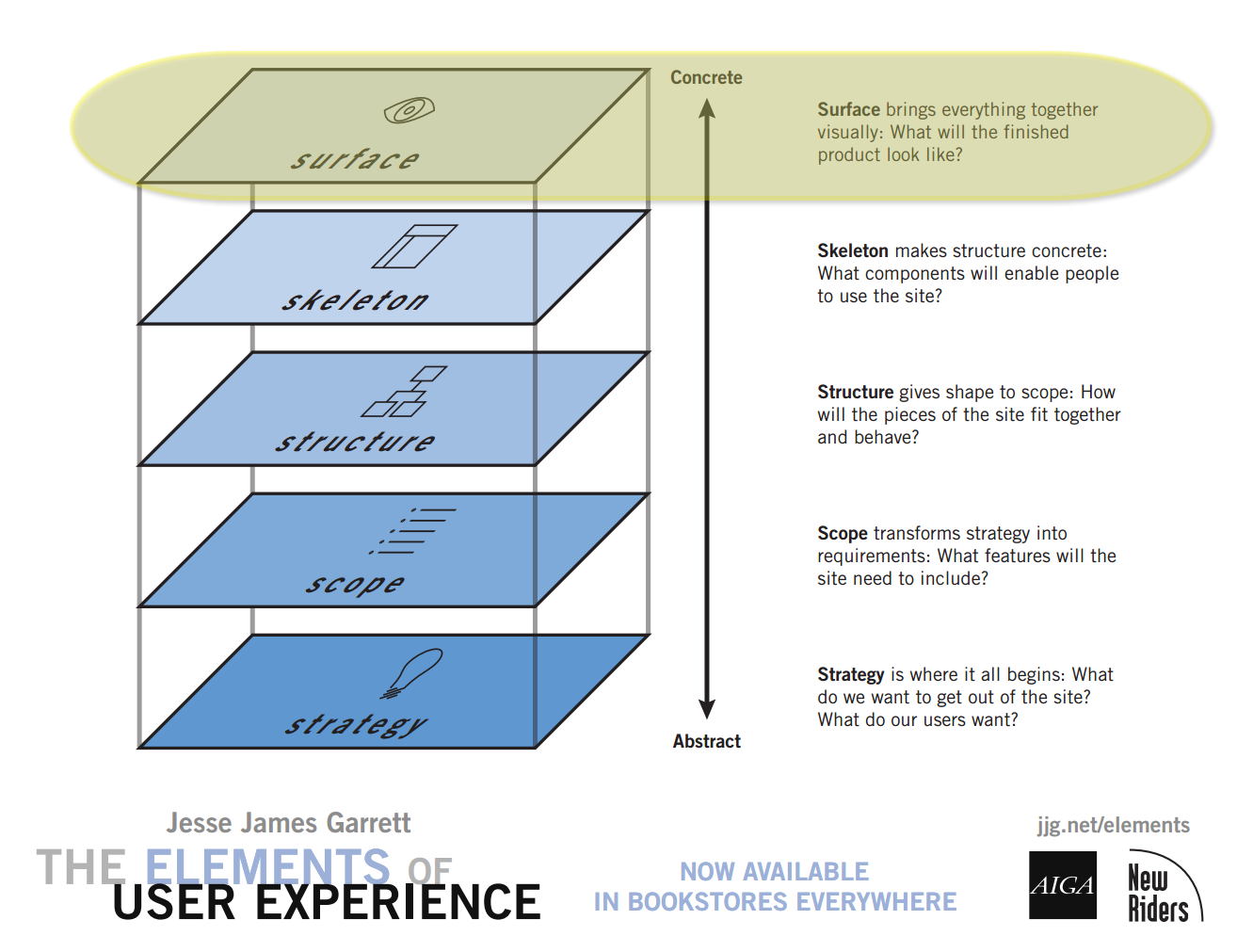
- Final Project - Skeleton
- Surface
Presentation contains 35 slides





JavaScript
- JavaScript and "Ajax"
- JavaScript helping with navigation
- JavaScript submitting a form
JavaScript and "Ajax"
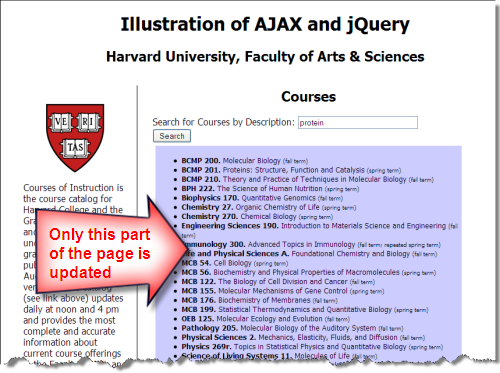
XHR/Ajax flow: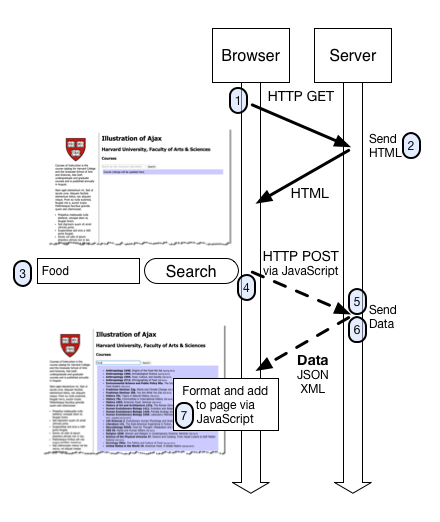
- The browser makes an HTTP GET request for the search page
- The server responds with the HTML content.
Note that we are not showing browser requests for other page resources such as image, CSS, or JavaScript files - The user types in a search term and clicks the submit button (or presses "enter")
- A JavaScript event handler is triggered on the form submit, and JavaScript sends an HTTP request via the browser to the server. This HTTP request contains the search term typed in by the user as a parameter sent to the server
- A program on the server searches the course database for any courses that contain the search term.
- The program (via the web server) returns the matching courses in a data format to the browser (typically in JSON format)
- The browser receives the data, hands it off to the JavaScript, and the JavaScript formats the data into HTML and updates the search area on the page
What the browser does
- Initiates an HTTP request to server, and receives data
An event handler in JavaScript for the form submit is triggered, and JavaScript sends an HTTP request to the server that includes the search term the user typed in. In an Ajax context, the response from the server is not necessarily HTML meant to be displayed directly, but is data. - Formats and Displays Data on the Page
The JavaScript that is part of the page is used to format the data into markup, and then place this newly created markup on the page itself so that it is displayed to the user.
What the server does
The server is simply responding to HTTP requests, and sending responses back to the browser. The "how" of looking up courses in a database based on a keyword search term is beyond the scope of this lesson -- we will demystify that part later in the course.
A Collection of Technologies
So we see Ajax is really a collection of technologies that are working together to send and receive data to and from the web server based on user actions, and to format and display this data to the user.
Some of the key technologies involved are:
- HTML
- CSS
- JavaScript
- DOM (Document Object Model)
The DOM is used to format the content and manipulate the content of the page that is displayed in the browser. This can be done directly with DOM methods, or by using a JS template library to produce content from a template. - XHR object (XHR = XMLHttpRequestObject)
This is the object in JavaScript that constructs and sends the request back to the server
- DOM (Document Object Model)
- Data formats
- JSON (JavaScript Object Notation)
What can you do with Ajax/XHR?
- Partial update of page
- Periodic polling for new/changed data
- "Event"-driven interaction (instead of 'form submit'-driven)
- click, mouseover, submit, etc.
- Incorporate data and functionality from other sites into your web site
- Your data + functionality from elsewhere
- Your functionality + data from elsewhere
JS Data Structures - array and "object" (key/value pair)
JSON - JavaScript Object Notation
JSON array Example:
['Autumn', 'Winter', 'Spring', 'Summer']
JSON object Examples:
Simple "name/value" pairs:
         {
           "lastName" : "Bacow",
           "firstName" : "Lawrence",
           "email" : "president@harvard.edu"
         }
"name/value" pairs, with values being an array (list) of things:
         {
           "apples" : ['Macoun','Empire','Honey Crisp','Albemarle Pippin'],
           "oranges" : ['Navel Orange','Tangelo','Clementine','Valencia Orange']
         }
More about JSON
A data format widely used in Ajax is JSON -- this format is used to pass data from the web server to the browser, and it is in a format that is easily worked with in JavaScript.
We first need to take a look at the JSON format and how we can work with it, and then we'll see how this works together in Ajax.
The introduction to JSON from json.org is a great place to start:
JSON (JavaScript Object Notation) is a lightweight data-interchange format. It is easy for humans to read and write. It is easy for machines to parse and generate. It is based on a subset of the JavaScript Programming Language, Standard ECMA-262 3rd Edition - December 1999. JSON is a text format that is completely language independent but uses conventions that are familiar to programmers of the C-family of languages, including C, C++, C#, Java, JavaScript, Perl, Python, and many others. These properties make JSON an ideal data-interchange language.
JSON is built on two structures:
- A collection of name/value pairs. In various languages, this is realized as an object, record, struct, dictionary, hash table, keyed list, or associative array.
- An ordered list of values. In most languages, this is realized as an array, vector, list, or sequence.
These are universal data structures. Virtually all modern programming languages support them in one form or another. It makes sense that a data format that is interchangeable with programming languages also be based on these structures.
There are several online JSON viewers and validators you can use that are helpful for exploring, writing, or validating JSON structures:
Ajax - Getting JSON from HTTP request
XHR - XMLHttpRequestObject
- Set function for when XHR status changes
- Will need to test if XHR is "DONE" and if we got a successful response (e.g. HTTP 200)
- Will need to parse the text as JSON
Javascript "fetch"
fetch(url).then(response => response.json()).then(data => processData(data));jQuery
jQuery makes this easier with the ".getJSON" method!
Let's Try It Out!
- Apples
- MLB Teams
- National Park Service API
Apples
You may find a "JSON Viewer" plugin or extension for your browser useful
if you work with JSON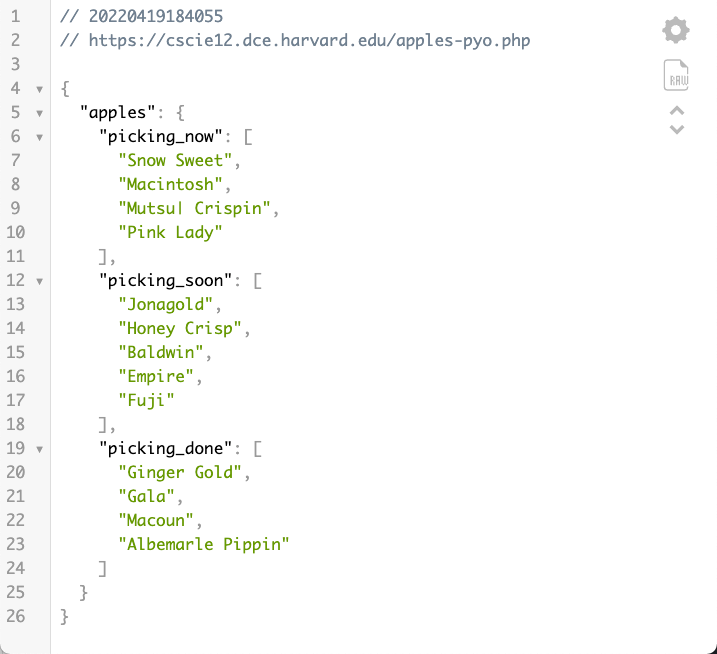
Apples
- apples-fetch.html
- JSON data apples-pyo.php
The JavaScript:
let applesUrl = "https://cscie12.dce.harvard.edu/apples-pyo.php";
document.addEventListener('DOMContentLoaded',function(){
  fetch(applesUrl)
    .then(response => response.json())
    .then(data => buildApplesList(data));
});

function buildApplesList(data){
  let template = document.getElementById('apple-template').innerHTML ;
  console.log(template);
  let compiledTemplate = Handlebars.compile(template);
  let rendered = compiledTemplate(data);
  document.getElementById('applelist').innerHTML = rendered;
}
The template:
<template id="apple-template">
<h2>Picking Now</h2>
  <ul>
    {{#apples.picking_now}}
      <li>{{ . }}
    {{/apples.picking_now}}
  </ul>

  <h2>Picking Soon</h2>
  <ul>
    {{#apples.picking_soon}}
      <li>{{ . }}
    {{/apples.picking_soon}}
  </ul>
</template>
MLB
MLB Data from mlbapidata: https://statsapi.mlb.com/api/v1/teams?sportId=1
Here's a snippet of JSON:
{
  "id": 144,
  "name": "Atlanta Braves",
  "link": "/api/v1/teams/144",
  "season": 2021,
  "venue": {
    "id": 4705,
    "name": "Truist Park",
    "link": "/api/v1/venues/4705"
  },
  "springVenue": {
    "id": 5380,
    "link": "/api/v1/venues/5380"
  },
  "teamCode": "atl",
  "fileCode": "atl",
  "abbreviation": "ATL",
  "teamName": "Braves",
  "locationName": "Atlanta",
  "firstYearOfPlay": "1871",
  "league": {
    "id": 104,
    "name": "National League",
    "link": "/api/v1/league/104"
  },
  "division": {
    "id": 204,
    "name": "National League East",
    "link": "/api/v1/divisions/204"
  },
  "sport": {
    "id": 1,
    "link": "/api/v1/sports/1",
    "name": "Major League Baseball"
  },
  "shortName": "Atlanta",
  "franchiseName": "Atlanta",
  "clubName": "Braves",
  "springLeague": {
    "id": 115,
    "name": "Grapefruit League",
    "link": "/api/v1/league/115",
    "abbreviation": "GL"
  },
  "allStarStatus": "N",
  "active": true
},
MLB - XHR
/* mlb api;  sportId = 1 is major league */
let urlTeams = "https://statsapi.mlb.com/api/v1/teams?sportId=1",
  xhr = new XMLHttpRequest();

document.addEventListener("DOMContentLoaded", function () {
  console.log("dom ready");
  xhr.responseType = "json";
  xhr.open("GET", urlTeams);
  xhr.addEventListener("load", buildList);
  xhr.send();
});

function buildList() {
  let teams = xhr.response.teams;
  teams.sort((a, b) => (a.name > b.name ? 1 : -1));
  let teamlist = document.createElement("ul");
  for (const team of teams) {
    console.log(team);
    console.log(team.name);
    let myli = document.createElement("li");
    let myanchor = document.createElement("a");
    let mytext = document.createTextNode(team.name);
    let teamUrlPath = team.teamName.toLowerCase().replace(" ", "");
    let myteamhref = "https://mlb.com/" + teamUrlPath;
    myanchor.setAttribute("href", myteamhref);
    teamlist.appendChild(myli).appendChild(myanchor).appendChild(mytext);
  }
  document.getElementById("teamscontainer").appendChild(teamlist);
}
MLB - fetch
/* mlb api;  sportId = 1 is major league */
let urlTeams = "https://statsapi.mlb.com/api/v1/teams?sportId=1";

document.addEventListener("DOMContentLoaded", function () {
  fetch(urlTeams)
    .then((response) => response.json())
    .then((data) => buildList(data.teams));
});
MLB - getJSON with jQuery
/* mlb api;  sportId = 1 is major league */
let urlTeams = "https://statsapi.mlb.com/api/v1/teams?sportId=1";

$(document).ready(function () {
  $.getJSON(urlTeams, buildList);
});
National Park Service API
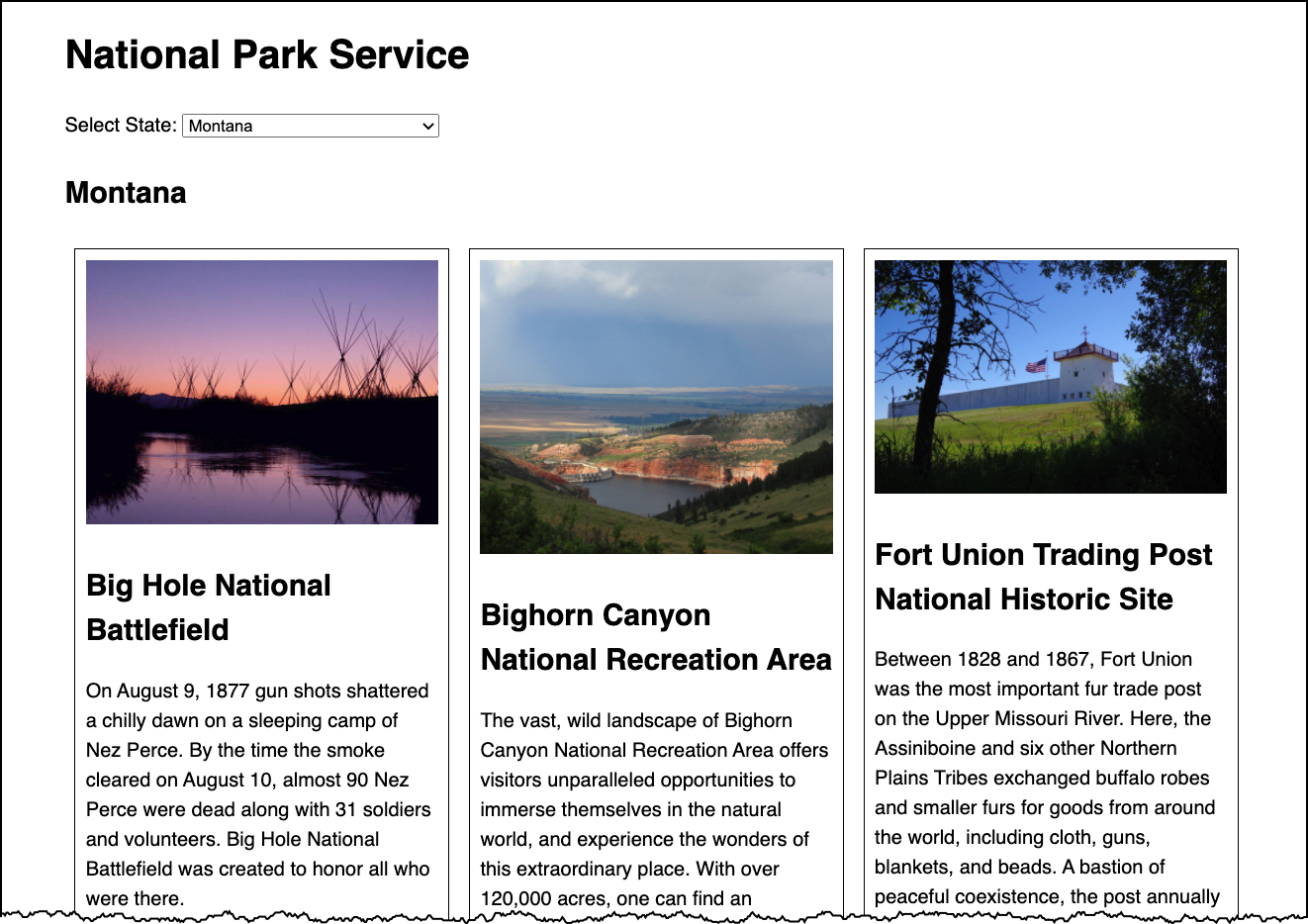
Approach:
- Understand the data
- Static data
- XHR + JSON with static URL
- XHR + JSON with adjustable URL
- Get state data from user
Same Origin Policy and CORS
When working with XHR/Ajax, it is important to understand some basic concepts of web application security. Some concepts we'll briefly describe are:
- Same Origin Policy
- CORS (Cross Origin Resource Sharing)
These are important to understand since the browser restricts the XHR calls allowed.
Same Origin Policy
This is the simplest policy, and will cover all cases where the data you are requesting comes from the same hostname as the page making the request.
Under the same origin policy, a web browser will permit JavaScript contained in a web page to access data from the same origin -- or the same "hostname" of the URL.
So if your JavaScript and the data it is accessing all come from the same origin (hostname in the URL), the browser will permit this communication.
If the JavaScript and the data come from different origins (hostnames), then the browser will block this for security reasons.
For JavaScript to access data that comes from different origins, you'll need to make sure CORS headers are set correctly.
CORS - Cross Origin Resource Sharing
CORS is a common and preferred method for handling cross-origin requests.
Using CORS, it is possible for the browser and server to determine whether or not to allow a cross-origin request. This happens as part of the HTTP request. The server can specify access control rules, which a browser will then use to determine whether a cross-origin request is permitted.
We won't go into how make the server-side CORS compatible right now. From the front-end perspective, it is enough to understand that you are using a CORS-enabled service. You don't need to do anything to enable CORS from within your JavaScript -- it already is there and is used by the browser.
HTTP response header:access-control-allow-origin: *
For example, the service from "cdn.rawgit.com" (e.g. apples.json) uses CORS, which is why the "Pick Your Own Apples" example worked fine, despite the different origins between the page the JSON.
MDN: Cross-Origin Resource Sharing
JavaScript to Submit a Form
document.addEventListener("DOMContentLoaded",function(){
    let form = document.getElementById('comment-form');
    form.addEventListener("submit",function(ev){
        ev.preventDefault();
        sendData(form);
    });
});

function sendData(form) {
    const xhr = new XMLHttpRequest();

    // Bind the FormData object and the form element
    const fd = new FormData( form );

    // Define what happens on successful data submission
    xhr.addEventListener( "load", function(ev) {
        console.log(ev.target.responseText);
        form.innerHTML = 'Thank you for your feedback.';
    } );

    // Define what happens in case of error
    xhr.addEventListener( "error", function( ev ) {
        console.log('Oops! Something went wrong.');
    } );

    // Set up our request
    xhr.open( form.getAttribute('method'), form.getAttribute('action') );

    // The data sent is what the user provided in the form
    xhr.send( fd );
}
Javascript Helping with Navigation
We can use JavaScript to make sure we have the right navigation for the page!
Web Navigation Systems
- Where am I?
- Where can I go?
- What is close by?
- What is further away?
- Where have I been?
Don't Make Me Think: Navigation
- it tells us what's here
- it tells us how to use the site
- it gives us confidence in the people who built it
Various Forms of Navigation
- global navigation
- site ("tab") navigation
- breadcrumb navigation
- clamshell navigation
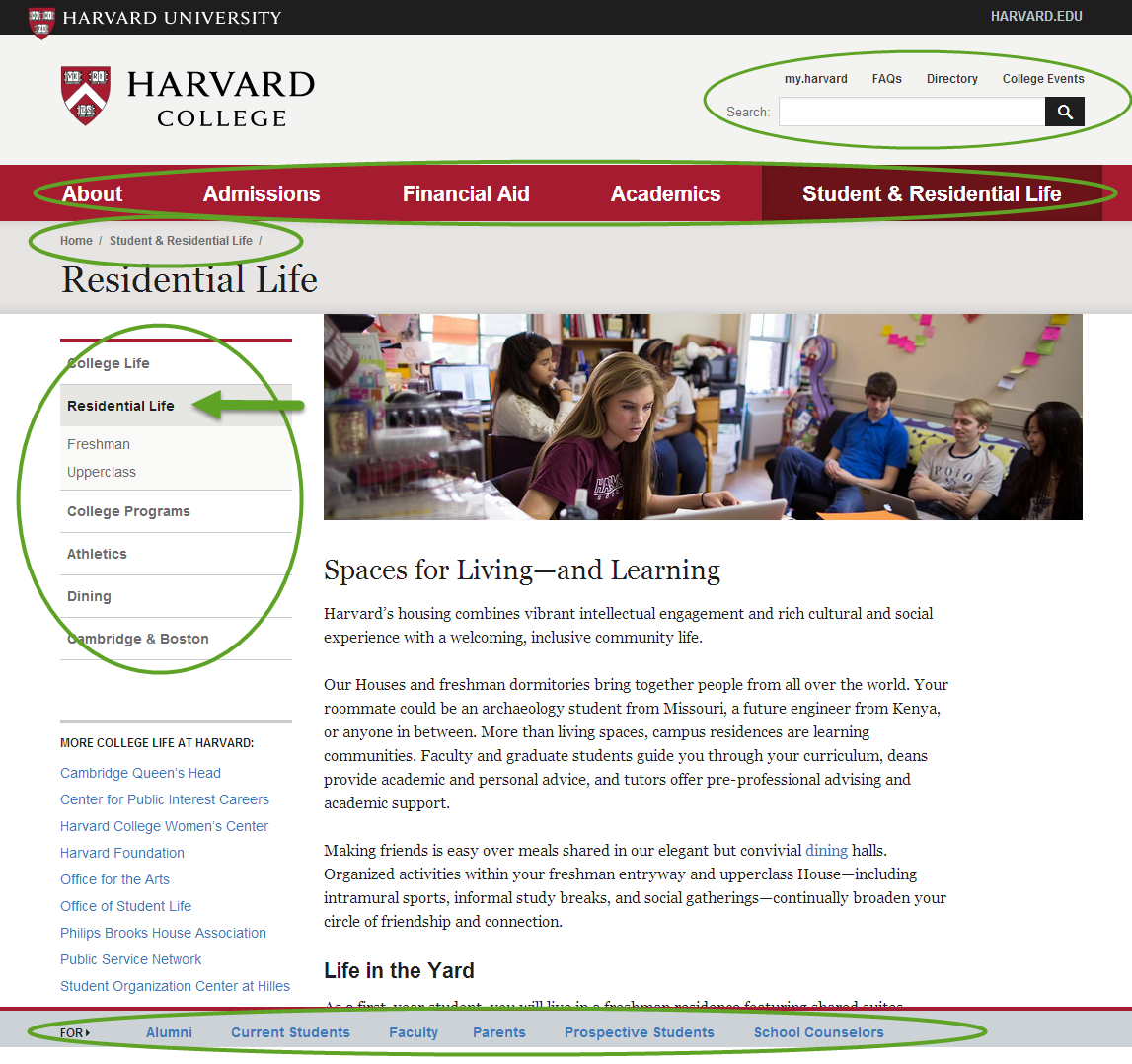
Some navigation systems illustrated
Breadcrumb, Clamshell, Tab / Horizontal List, Dropdown
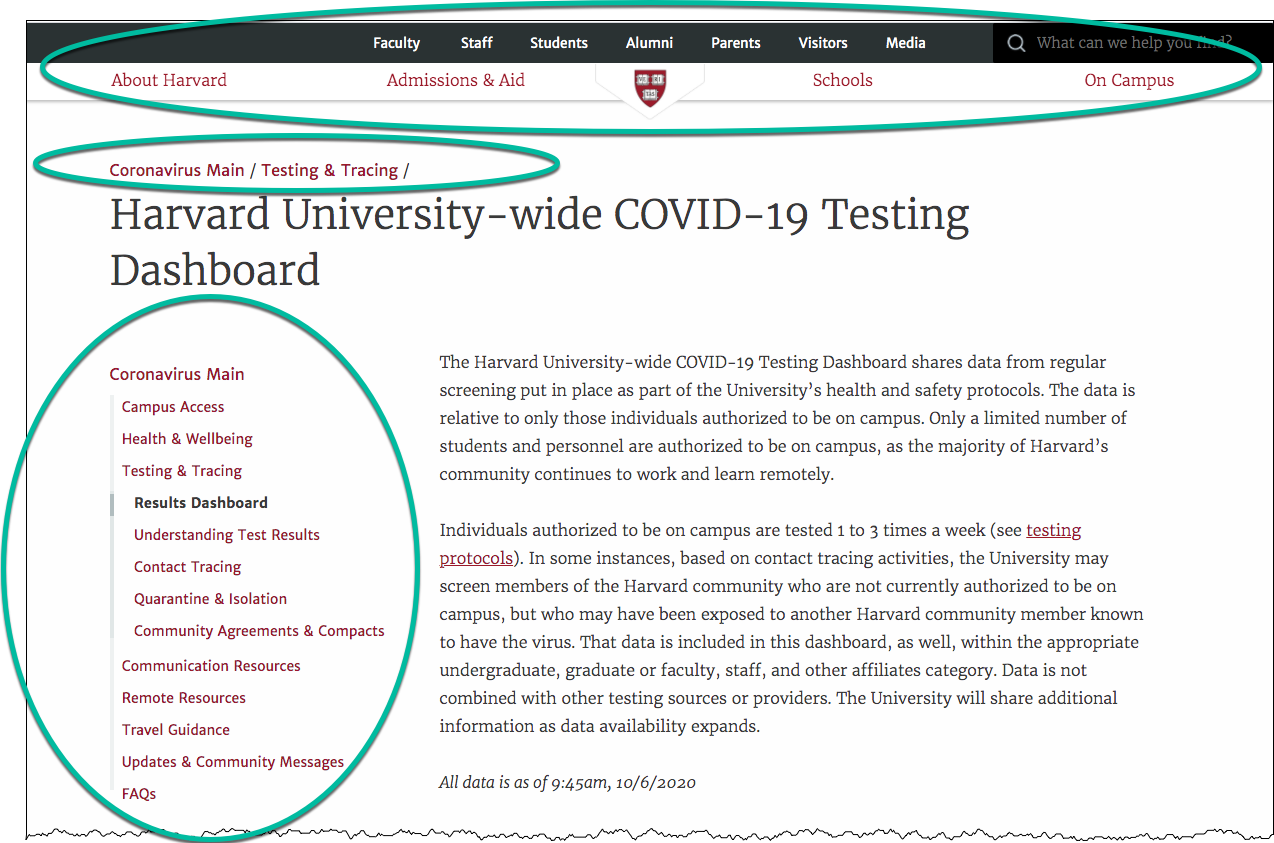
Navigation
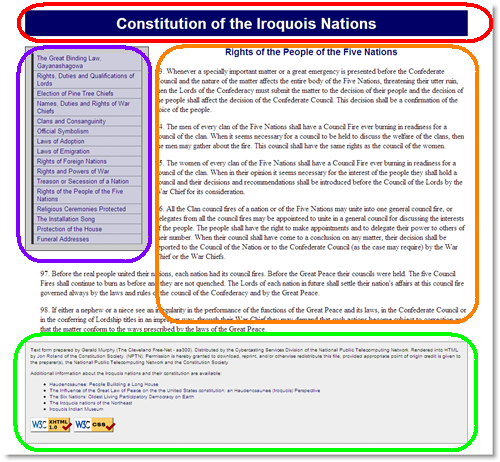
<html>
  <head>
    <title>The Great Binding Law, Gayanashagowa (Constitution of the Iroquois Nations)</title>
    <link rel="stylesheet"  href="style.css" />
  </head>
  <body id="part1">
    <?php include("inc/header.php"); ?>
    <?php include("inc/nav.php"); ?>
    <main>
      <?php include("inc/content1.php"); ?>
    </main>
    <?php include("inc/footer.php"); ?>
  </body>
</html>
"You are here" with CSS
"You are Here" CSS Example in JSFiddle
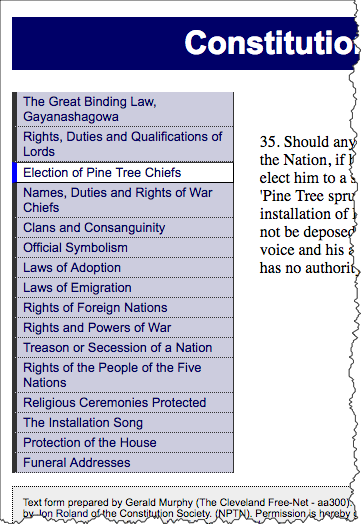
<nav id="navigation">
  <ul id="mainnav">
    <li id="navpart1"><a href="1.shtml">The Great Binding Law, Gayanashagowa</a></li>
    <li id="navpart2"><a href="2.shtml">Rights, Duties and Qualifications of Lords</a></li>
    <li id="iamhere"><a href="3.shtml">Election of Pine Tree Chiefs</a></li>
    <li id="navpart4"><a href="4.shtml">Names, Duties and Rights of War Chiefs</a></li>
    <li id="navpart5"><a href="5.shtml">Clans and Consanguinity</a></li>
    <li id="navpart6"><a href="6.shtml">Official Symbolism</a></li>
    <li id="navpart7"><a href="7.shtml">Laws of Adoption</a></li>
    <li id="navpart8"><a href="8.shtml">Laws of Emigration</a></li>
    <li id="navpart9"><a href="9.shtml">Rights of Foreign Nations</a></li>
    <li id="navpart10"><a href="10.shtml">Rights and Powers of War</a></li>
    <li id="navpart11"><a href="11.shtml">Treason or Secession of a Nation</a></li>
    <li id="navpart12"><a href="12.shtml">Rights of the People of the Five Nations</a></li>
    <li id="navpart13"><a href="13.shtml">Religious Ceremonies Protected</a></li>
    <li id="navpart14"><a href="14.shtml">The Installation Song</a></li>
    <li id="navpart15"><a href="15.shtml">Protection of the House</a></li>
    <li id="navpart16"><a href="16.shtml">Funeral Addresses</a></li>
  </ul>
</nav>
And the CSS:
#navigation a {
  /* Rules for navigation items */
}
#navigation a:hover {
  /* Rules for navigation items */
}

/* Rules specific for "you are here" */
#navigation #iamhere a,
#navigation #iamhere a:hover {
  /* Rules for the "you are here" item */
}
"You are here" with JavaScript
View this technique in action.
Example in JSFiddle
- Each
bodyis uniquely identified (id) - Each navigation list item gets an
id - CSS rule for
id="iamhere" - JavaScript to set the "iamhere"
id
Note the id of the body:
<html>
<head>
    <title>Election of Pine Tree Chiefs (Constitution of the Iroquois Nations)</title>
    <link rel="stylesheet"  href="style.css" />
  </head>
  <body id="part3">
    <?php include("inc/header.php"); ?>
    <?php include("inc/nav.php"); ?>
    <main>
      <?php include("inc/content3.php"); ?>
    <main>
    <?php include("inc/footer.php"); ?>
  </body>
</html>
Each navigation item has an id:
<nav id="navigation">
  <ul id="mainnav">
    <li id="navpart1"><a href="1.shtml">The Great Binding Law, Gayanashagowa</a></li>
    <li id="navpart2"><a href="2.shtml">Rights, Duties and Qualifications of Lords</a></li>
    <li id="navpart3"><a href="3.shtml">Election of Pine Tree Chiefs</a></li>
    <li id="navpart4"><a href="4.shtml">Names, Duties and Rights of War Chiefs</a></li>
    <li id="navpart5"><a href="5.shtml">Clans and Consanguinity</a></li>
    <li id="navpart6"><a href="6.shtml">Official Symbolism</a></li>
    <li id="navpart7"><a href="7.shtml">Laws of Adoption</a></li>
    <li id="navpart8"><a href="8.shtml">Laws of Emigration</a></li>
    <li id="navpart9"><a href="9.shtml">Rights of Foreign Nations</a></li>
    <li id="navpart10"><a href="10.shtml">Rights and Powers of War</a></li>
    <li id="navpart11"><a href="11.shtml">Treason or Secession of a Nation</a></li>
    <li id="navpart12"><a href="12.shtml">Rights of the People of the Five Nations</a></li>
    <li id="navpart13"><a href="13.shtml">Religious Ceremonies Protected</a></li>
    <li id="navpart14"><a href="14.shtml">The Installation Song</a></li>
    <li id="navpart15"><a href="15.shtml">Protection of the House</a></li>
    <li id="navpart16"><a href="16.shtml">Funeral Addresses</a></li>
  </ul>
</nav>
And the CSS:
#navigation a {
      /* Rules for navigation items */
    }
    #navigation a:hover {
      /* Rules for navigation items */
    }

    /* Rules specific for "you are here" */
    #navigation #iamhere a,
    #navigation #iamhere a:hover {
      /* Rules for the "you are here" item */
    }
And the JavaScript (using jQuery) that finds the correct navigation item and sets
the id attribute value to "iamhere":
document.addEventListener('DOMContentLoaded',function(){
	console.log("Ready!");
  let mybodyid = document.querySelector('.this_should_be_the_body').getAttribute('id');
  let mynavid = '#nav' + mybodyid;
  /* e.g. for 3.shtml:
      mybodyid is 'part3'
      mynavid  is '#navpart3'
   */
  document.querySelector(mynavid).setAttribute('id','iamhere');
});
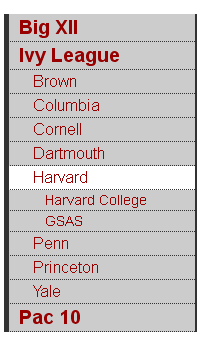
Pages from Parts and Clamshell Navigation
Here we take advantage of CSS selectors in JQuery, along with "parents" and "children" and "show" and "hide" methods.
- Set "iamhere" id
- Close all nested lists
- Show parents of "iamhere"
- Show children of "iamhere"
$(document).ready(function(){
      console.log("Ready!");
      var mybodyid = $('body').attr('id');
      var mynavid = '#nav_' + mybodyid;
      console.log("mybodyid is " + mybodyid);
      console.log("mynavid is " + mynavid);

      // Set iamhere id
      $(mynavid).attr('id','iamhere');

      // hide all nested lists
      $('#navigation ul ul').hide();

      // show parents of "iamhere"
      $('#iamhere').parents().show();

      // show children of "iamhere"
      $('#iamhere').children().show();
});
JSFiddle Example
Note for the JSFiddle example, we are using a 'div' to contain the 'id' instead of the 'body'.
Clamshell Navigation in JS Fiddle
Files
- clamshell.html
And see it more slowly in steps, triggered by a button click: clamshell-2.html - style-clamshell.css
Final Project - Skeleton
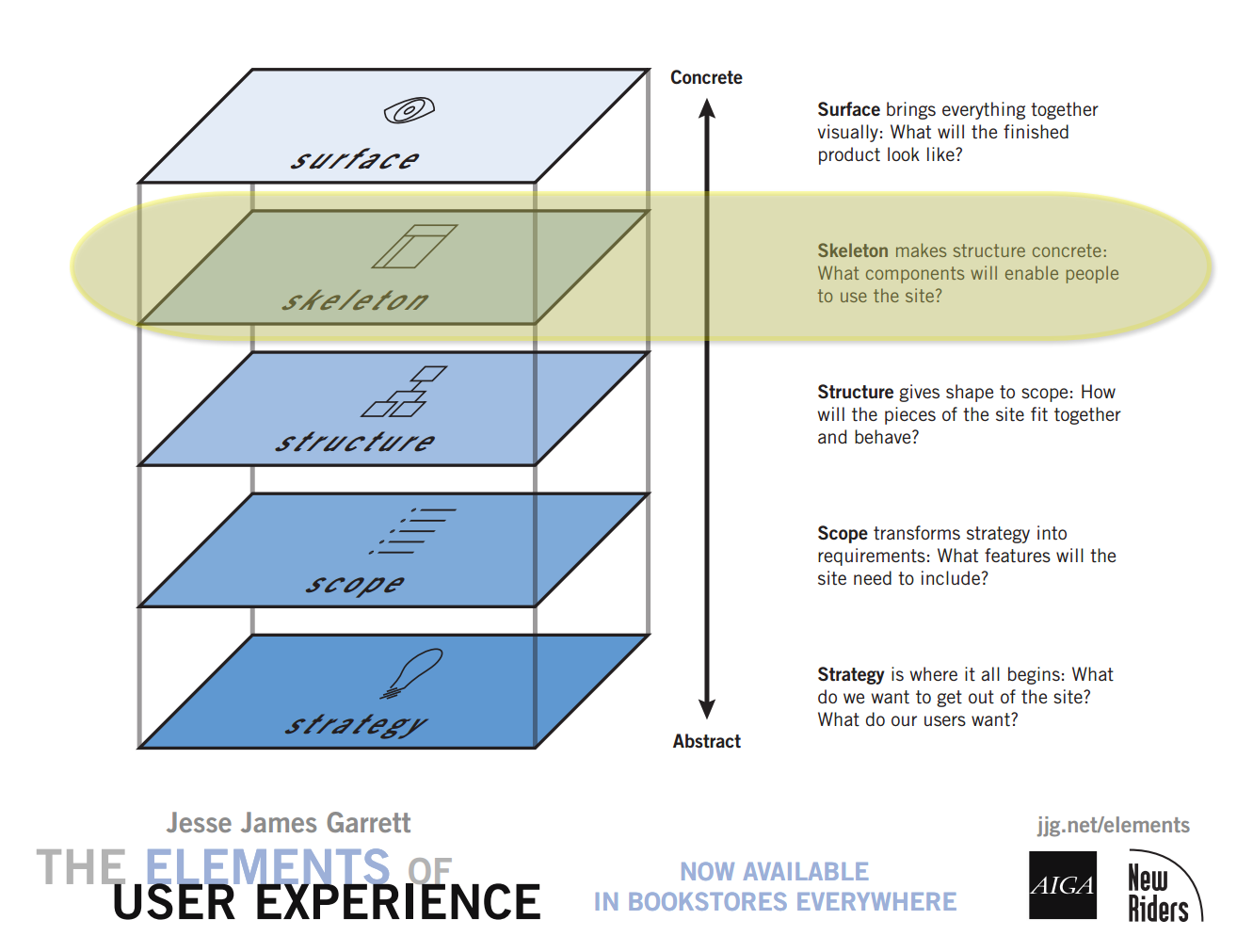
Page Components
- Header
- Navigation
- Content
- Plan out content skeleton
- Footer
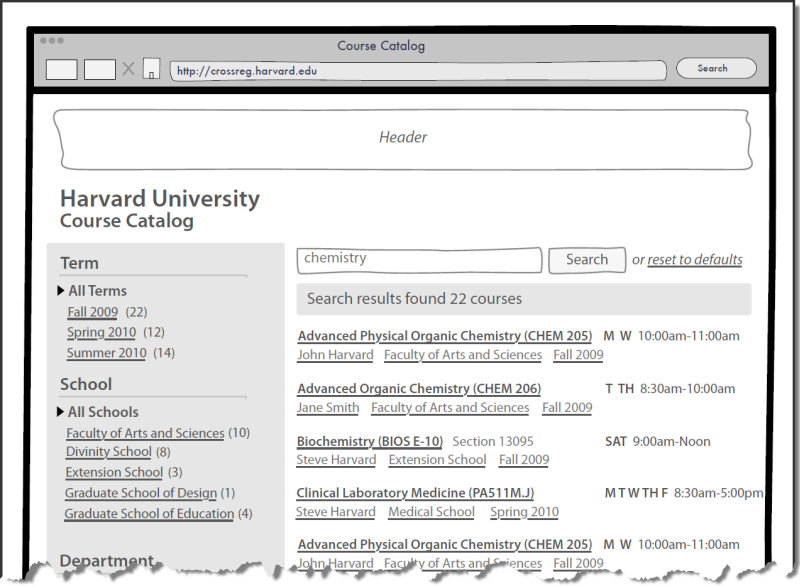
Wireframes and Sketches - "Low" to "High" Fidelity
Tools to consider:
Sketches
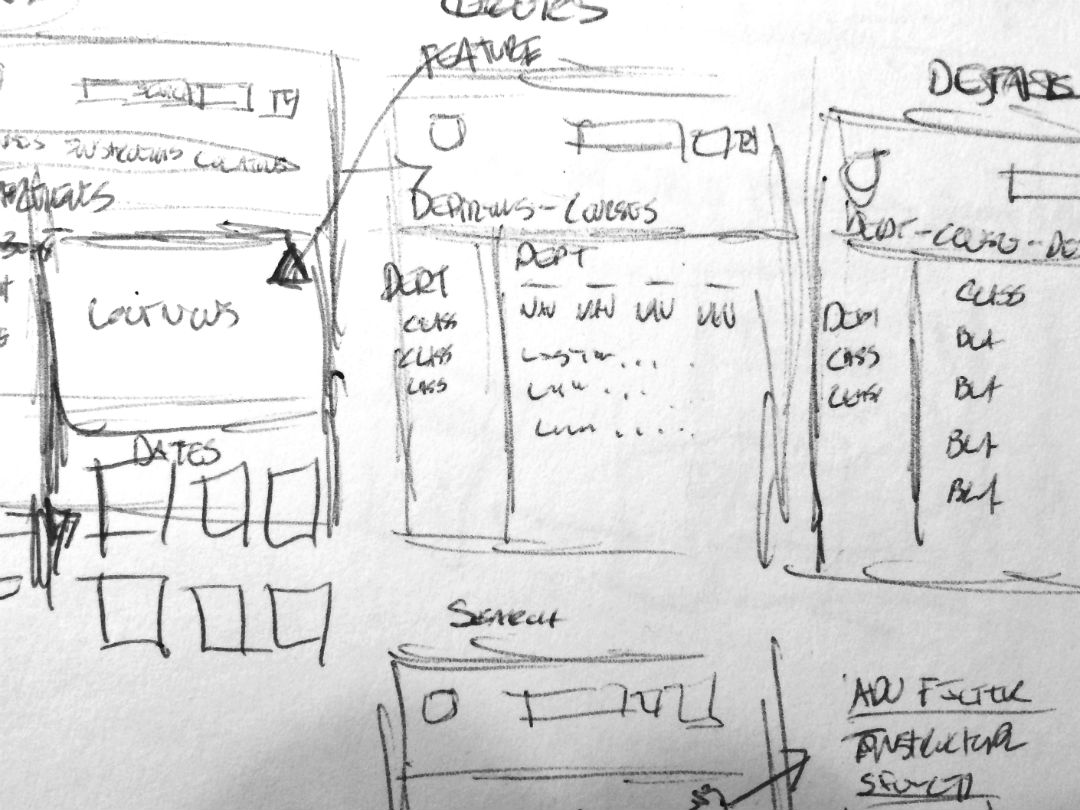
Wireframes
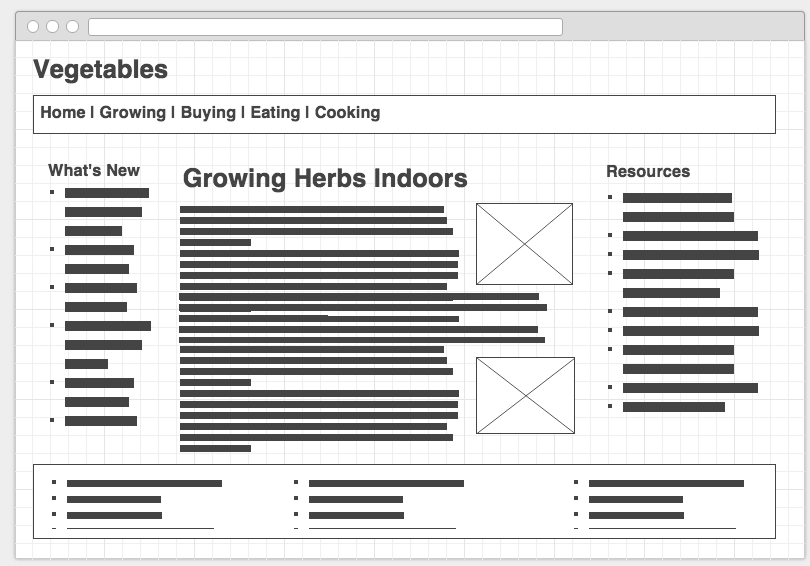
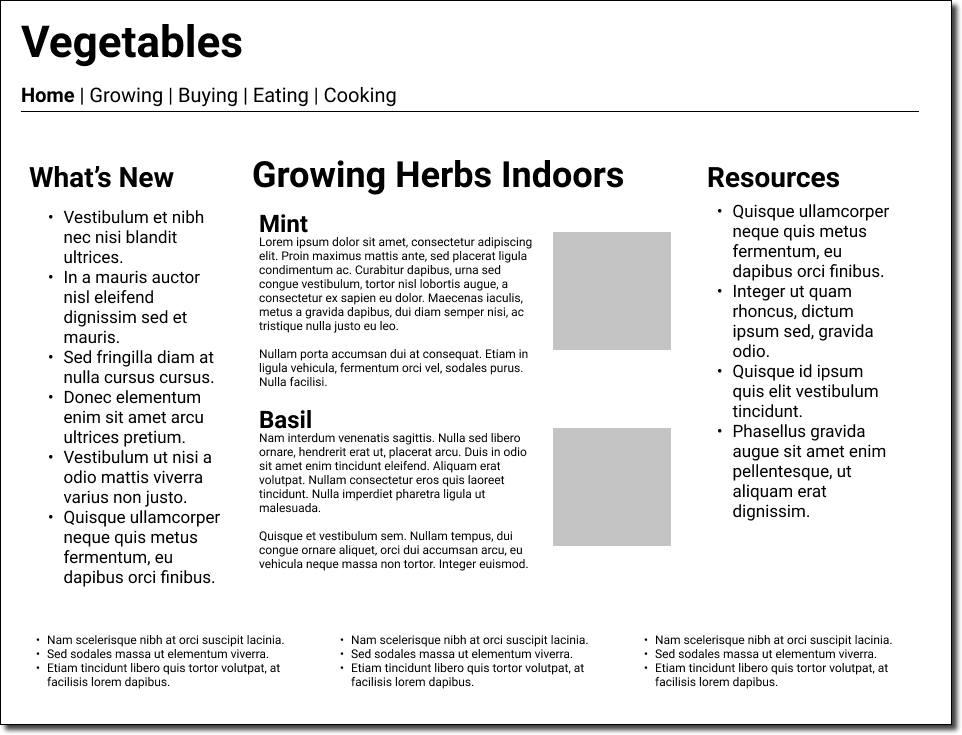
Wireframes - Drawing and prototype
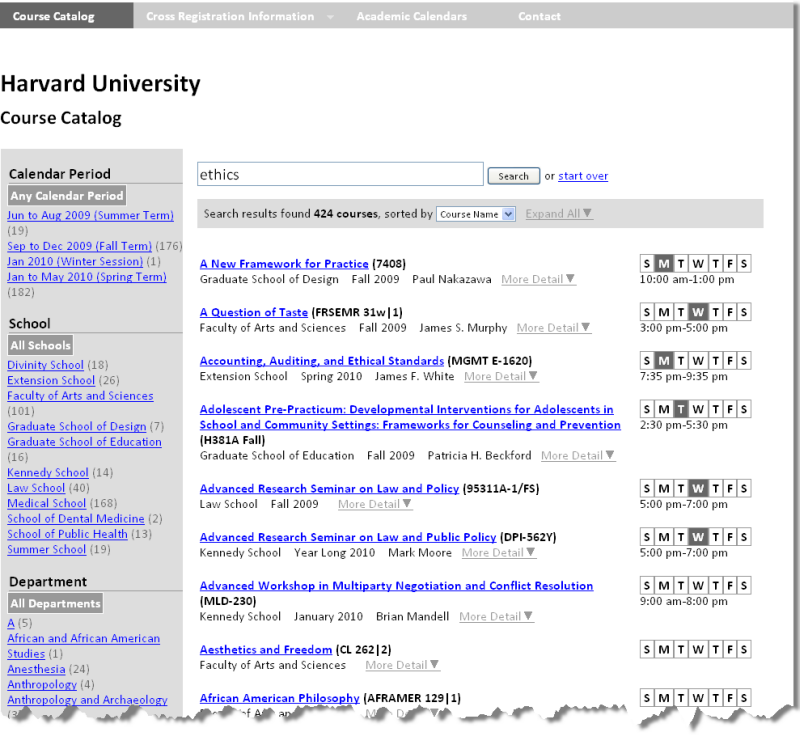
Surface
Non-Designer's Design Book



The non-designer's design book by Robin Williams
Non-Designer's Design Book
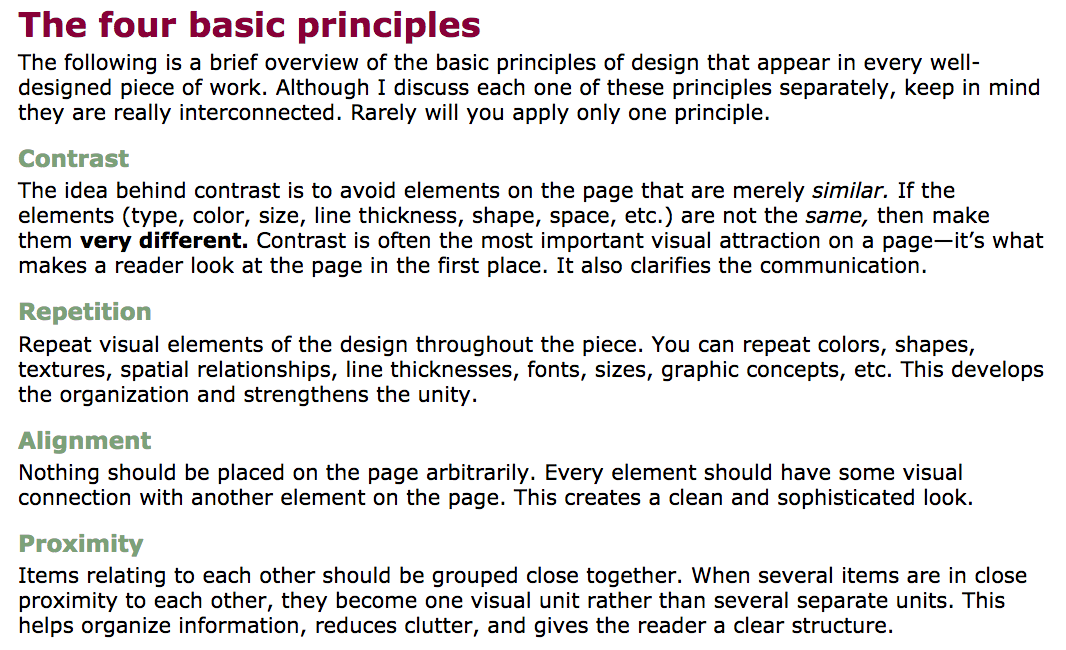
The non-designer's design book by Robin Williams
Colors
- Non-Designer's Design Book: Chapter 7, Design with Color
Creating Color Palettes:
Home Page -- Don't Make Me Think (Steven Krug)
- What is this?
- What do they have here?
- What can I do here?
- Why should I be here and not somewhere else?
Don't make me think

Don't make me think, revisited : a common sense approach to Web usability by Steve Krug
Three Princples of Usability
- Don't make me think.
- It doesn't matter how many times I have to click, as long as each click is a mindless, unambiguous choice.
- Get rid of half the words on each page, then get rid of half of what is left.