Ice Cream Options
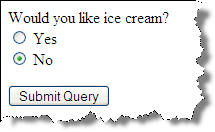
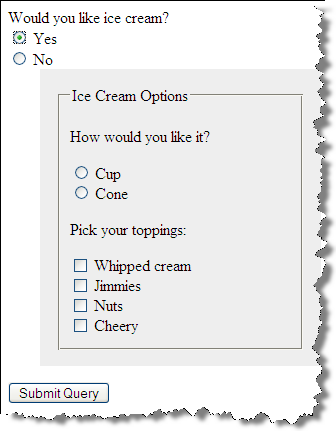
Example
9.1 - Ice Cream Options - Example 9.1
 <form method="post" name="ice_cream" id="ice_cream" action="https://cs12.net/form/submit.php">
   <div>Would you like ice cream?
     <label>
       <input type="radio" name="want" id="ic_yes" value="yes"/>
Yes     </label>
     <label>
       <input type="radio" name="want" id="ic_no" value="no"/>
No     </label>
   </div>
   <fieldset id="icecream_options">
     <legend>Ice Cream Options     </legend>
     <p>Cup or a Cone?
     </p>
     <label>
       <input type="radio" id="container_cup" name="container" value="cup"/>
Cup     </label>
     <label>
       <input type="radio" id="container_cone" name="container" value="cone"/>
Cone     </label>
     <p>Pick your toppings:
     </p>
     <label>
       <input type="checkbox" name="toppings" id="toppings_wc" value="whipcream"/>
Whipped cream     </label>
     <label>
       <input type="checkbox" name="toppings" id="toppings_jimmies" value="jimmies"/>
Jimmies     </label>
     <label>
       <input type="checkbox" name="toppings" id="toppings_sprinkles" value="sprinkles"/>
Sprinkles     </label>
     <label>
       <input type="checkbox" name="toppings" id="toppings_nuts" value="nuts"/>
Nuts     </label>
     <label>
       <input type="checkbox" name="toppings" id="toppings_cherry" value="cherry"/>
Cherry     </label>   </fieldset>
   <button type="submit">Submit Order   </button>
 </form>
In style
element
(<style>) within head element:
#icecream_options {  background-color: rgb(238, 238, 238);
  padding: 1rem;
  margin-top: 1rem;
  display: block;
} #icecream_options.hide { display: none; }
label { display: block; }
In
script element within head element (<script>):
document.addEventListener("DOMContentLoaded", function() {
  console.log('dom is loaded!');
   let icOptions = document.getElementById('icecream_options');
   console.log(icOptions);

   icOptions.classList.add('hide');

   let yesRadio = document.getElementById('ic_yes');

   yesRadio.addEventListener('click', function(){
       /* remove "hide" class from icecream_options */
       if (yesRadio.checked == true) {
           icOptions.classList.remove('hide');
       }
   });

   let noRadio = document.getElementById('ic_no');
   noRadio.addEventListener('click',function(){
       /* add 'hide' class */
       if (noRadio.checked == true) {
           icOptions.classList.add('hide');
       }
   });
});

}