Session 14 - Server-Side: HTTP and Apache Web Server Configuration
Harvard Extension School
Spring 2021
Course Web Site: https://cscie12.dce.harvard.edu/
Topics
- Wrapping Up
- The Internet and the Web
- HyperText Transfer Protocol
- Apache HTTP Server
- Caching - Don't deliver content unnecessarily
- Minify and Compress Content
- Friendly Errors
- Friendly Ways to Get There
- Search Engines and Optimization
- Accessibility
- Oh, The Places You'll Go!
Presentation contains 48 slides





Wrapping Up
- Office Hours - scheduled and "open"!
- May 11, Final Project due at 6pm US/Eastern
- May 11, Class Meeting Time, Optional Presentations (3 to 5 min) of Final Projects
- I'll be posting an announcement this weekend for signup instructions.
Some Observations
- File structure organization:
- All of your html files at the top level
- directory/folder for images, styles, and scripts
. |-- index.html |-- hello-harvard.html |-- images | |-- harvard.jpg | `-- world.jpg |-- scripts | `-- map.js `-- styles `-- site.css - lowercase file names and without spaces
- Better:
my_favorite_teas.html - No:
My Favorite Teas.html
- Better:
- Within your site, use relative URL links.
- NOT relative:
<link rel="stylesheet" href="/styles/site.css"/><link rel="stylesheet" href="/Users/david/Desktop/final_project/styles/site.css"/>
- IF it begins with a "/", it isn't relative!
- NOT relative:
- Site-wide CSS Stylesheet!
One CSS stylesheet to style all of your HTML pages!
My Project Update
The Internet and the Web
Domain Names: Top Level Domains (TLD)
TLDs are managed by the Internet Assigned Numbers Authority (IANA)
Generic: .com, .org, .edu, .gov, etc.
Country codes: .ch, .cn, .de, .uk, .us, etc.
Getting Your Own Domain and Hosting
- Domain Name
- Buy the domain through a "registrar"
- Provide name servers
- About $10/yr
- Hosting
- Shared ($7-15/mo)
- Private / Cloud
A very short list of hosting companies as a place to start.
Web Server Software
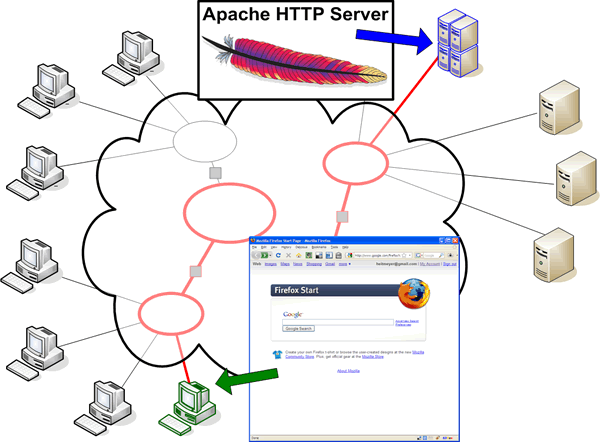
- Apache HTTP Server
- nginx
- Microsoft IIS
Web Server Market Share
HyperText Transfer Protocol
GET
United States National Archives
www.archives.gov
GET / HTTP/1.1
Host: www.archives.gov
User-Agent: curl/7.49.0
Accept: */*

HTTP/1.1 200 OK
Content-Type: text/html; charset=utf-8
Connection: keep-alive
Date: Thu, 30 Jul 2020 23:25:09 GMT
Content-Language: en
Set-Cookie: UUID=7efbfc41-6054-bf24-f977-24eb8d075e4e; expires=Fri, 30-Jul-2021 23:06:47 GMT; Max-Age=31536000; path=/; domain=.archives.gov; httponly
Last-Modified: Thu, 30 Jul 2020 23:06:47 GMT
Strict-Transport-Security: max-age=31536000; includeSubDomains; preload
X-Content-Type-Options: nosniff
ETag: W/"1596150407-0-gzip"
v-ttl: 2497
Cache-Control: public, max-age=60, s-maxage=180
v-cache-ttl: 2497
X-Frame-Options: SAMEORIGIN
Accept-Ranges: bytes
Vary: Cookie,Accept-Encoding
X-Cache: Miss from cloudfront
Via: 1.1 6c46ad9c24627fa8c065620a1a7a52a9.cloudfront.net (CloudFront)
X-Amz-Cf-Pop: EWR52-C1
X-Amz-Cf-Id: LqRBsWPmMMWNU4m66BY-LRfHuL1LI8Xrcd6unFAZ0VJJWWdO_I--uA==

<!DOCTYPE html>
  <!-- truncated for example -->
HTTP Overview
HTTP is Stateless
Each requested resource is a separate, independent, request to the server -- it is a stateless protocol.
HTTP Versions
- HTTP 1.0 (1996)
- HTTP 1.1 (1999)
- HTTP 2 (2014)
An HTTP Conversation
- Client Request
- METHOD Resource HTTP Version
- Client Generated Headers
- Request Body
- Server Response
- Status Line
- Server Generated Headers
- Data
HTTP 1.1 Methods
- GET
- POST
- HEAD
- PUT
- DELETE
- TRACE
- OPTIONS
HTTP Response Codes
HTTP 1.1 status codes commonly seen
- 200 OK
- 301 Moved permanently
- 302 Moved temporarily
- 304 Not modified
- 401 Unauthorized
- 403 Forbidden
- 404 Not found
- 500 Internal server error
The complete list:
Common Headers
Request (Browser)
- Host
- User-Agent
- Referer
- Accept
- Accept-Language
- Accept-Encoding
- Accept-Charset
- Cookie
- If-Modified-Since
Response (Server)
- Last-Modified
- Content-Length
- Content-Type
- Connection
Looking at HTTP Under the Hood
Use your browser developer tools!
HTTP Header: Host
Solution: "Virtual Hosts"
Example: all of the following names map to 140.247.197.241
- cscie12.dce.harvard.edu
- cscis12.dce.harvard.edu
- csci12.dce.harvard.edu
- aopophis.dce.harvard.edu
- cs12students.dce.harvard.edu
Host Header
This is required for HTTP 1.1 requests.
HEAD /http/raspberry.gif HTTP/1.1
Host: cscie12.dce.harvard.edu

HTTP/1.1 200 OK
Date: Tue, 8 Apr 2020 20:23:14 GMT
Server: Apache/2.2 (Fedora)
Last-Modified: Wed, 06 Apr 2015 19:30:42 GMT
ETag: "461fb8-348c-a0f67c80"
Accept-Ranges: bytes
Content-Length: 13452
Connection: close
Content-Type: image/gif

Connection closed by foreign host.
HTTP/2
- HTTP/2
- HPACK
What are the key differences to HTTP/1.x?
From the HTTP/2 FAQ:
At a high level, HTTP/2:
- is binary, instead of textual
- is fully multiplexed, instead of ordered and blocking
- can therefore use one connection for parallelism
- uses header compression to reduce overhead
- allows servers to “push” responses proactively into client caches
Apache HTTP Server

- Apache Software Foundation
- Apache HTTP Server Project
- Apache 2.x
- Apache Modules
- PHP
- Python
- many, many others
- Apache HTTP Server Project
Apache Configuration Overview
- Server Configuration
(
httpd.conf)
Unless you are the server administrator, you generally will not have access to this account. On the DCE systems, you do not have read or write access to this file. Server configuration is read at server start or restart. - Per Directory (
.htaccess)
Certain configuration directives for Apache can be placed within per-directory.htaccessfiles..htaccessfile is read on a per request basis.
Scope of .htaccess files
.htaccess files apply to the directory that
contains the .htaccess file and all its descendants.
Directives within the file,
/home/courses/j/h/jharvard/public_html/.htaccess
would apply to all files within and "under" the public_html directory for the user
jharvard.
Directives within the file,
/home/courses/j/h/jharvard/public_html/books/.htaccess
would apply to all files within and "under" the public_html/books
directory for the user jharvard.
Problems You Will Have with .htaccess files
- Internal Server Error
- Can't "see" the file
- Incorrect Permissions
500 Internal Server Error
500 Internal Server Error
:(
Problems You will encounter when using .htaccess files (Internal Server Error 500)
If you see begin seeing 500 Internal Server Error responses from the server after you have created or edited an
.htaccess file, the most
likely cause of the problem is incorrect permissions and/or an error in the directive
syntax.
- Permissions on the
.htaccessfile are not set correctly. Just like HTML and image files, the server must be able to read the.htaccessfile. The simplest way to allow that is to make your.htaccessfile readable by "other".
cscie12students% pwd
/home/courses/j/h/jharvard/public_html
cscie12students% ls -l .htaccess
-rw-------   1 jharvard  founder         349 Nov 27 00:03 .htaccess
cscie12students% chmod o+r .htaccess
cscie12students% ls -l ~/public_html/.htaccess
-rw----r--   1 jharvard  founder         349 Nov 27 00:03 .htaccess
- Syntax Error. An error in the syntax of a directive the
.htaccessfile will result in a 500 Internal Server Error. In addition, correct usage of a directive that is not allowed in the.htaccessfile will result in a 500 status code. Whether or not a directive is allowed depends upon the server configuration file (httpd.conf; AllowOverride) and the directive itself.
Problems You will encounter when using .htaccess files (Can't see the .htaccess file)
You can't "see" your .htaccess file.- HTTP
The web server is typically configured to deny requests for.htaccessfiles. For example, the file corresponding to the URL, http://cscie12.dce.harvard.edu/.htaccess exists and is readable by the Web server, but if we try to follow the link, we get a 403 Forbidden response. - UNIX
Thelscommand will not list files or directories that begin with a '.' (dot). In order to see the.htaccessfile when you do a directory listing, use the -a (all) option: - SFTP
Sometimes your SFTP program will hide the "dot" files unless explicitly told to show them.
Apache Configuration Sections
Within .htaccess
Note that onlyFiles and
FilesMatch can be used within .htaccess files.
Examples:
<Files .htaccess>
    Order allow,deny
    Deny from all
</Files>
Examples:
# deny access to any tilde backup files
<Files *~>
    Order allow,deny
    Deny from all
</Files>
Caching - Don't deliver content unnecessarily
- Faster Load Times == Happier Users
:) - Less Bandwidth == Lower Costs
Types of Caching
- Local (user's computer)
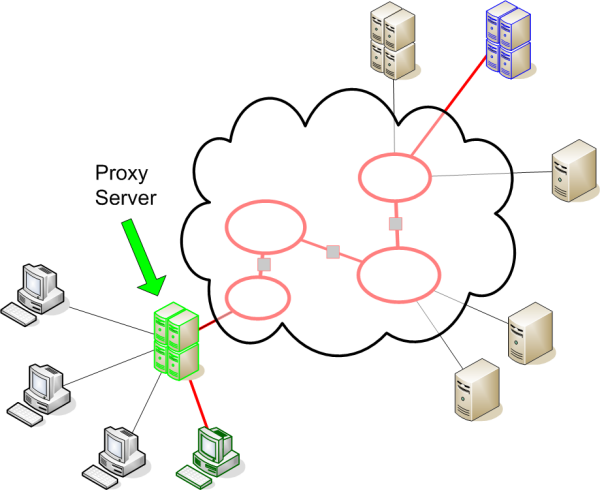
- Proxy-server
Caching Related Headers
Local cache and proxy-server cache.
- If-Modified-Since
- Age
- Expires
- Last-Modified
- Cache-Control
- ETag
Proxy Servers
If-Modified-Since
A request for the Apache Software Foundation logo (http://apache.org/img/asf_logo.png) that is part of loading
http://apache.org/foundation/
Initial request:
GET /img/asf_logo.png HTTP/1.1
Host: apache.org
Connection: keep-alive
Pragma: no-cache
Cache-Control: no-cache
Accept: image/webp,*/*;q=0.8
User-Agent: Mozilla/5.0 (Macintosh; Intel Mac OS X 10_9_5) AppleWebKit/537.36 (KHTML, like Gecko) Chrome/41.0.2272.118 Safari/537.36
Referer: http://apache.org/foundation/
Accept-Encoding: gzip, deflate, sdch
Accept-Language: en-US,en;q=0.8,ro;q=0.6

HTTP/1.1 200 OK
Date: Tue, 14 Apr 2015 22:40:52 GMT
Server: Apache/2.4.7 (Ubuntu)
Last-Modified: Tue, 14 Apr 2015 16:08:47 GMT
ETag: "751e-513b1721525d0"
Accept-Ranges: bytes
Content-Length: 29982
Cache-Control: max-age=3600
Expires: Tue, 14 Apr 2015 23:40:52 GMT
Keep-Alive: timeout=30, max=98
Connection: Keep-Alive
Content-Type: image/png
After expiration, if still located in local cache, browser will make a conditional request:
GET /img/asf_logo.png HTTP/1.1
Host: apache.org
Connection: keep-alive
Accept: image/webp,*/*;q=0.8
If-None-Match: "751e-513b1721525d0"
If-Modified-Since: Tue, 14 Apr 2015 16:08:47 GMT
User-Agent: Mozilla/5.0 (Macintosh; Intel Mac OS X 10_9_5) AppleWebKit/537.36 (KHTML, like Gecko) Chrome/41.0.2272.118 Safari/537.36
Referer: http://apache.org/foundation/
Accept-Encoding: gzip, deflate, sdch
Accept-Language: en-US,en;q=0.8,ro;q=0.6

HTTP/1.1 304 Not Modified
Date: Tue, 14 Apr 2015 22:42:51 GMT
Server: Apache/2.4.7 (Ubuntu)
Connection: Keep-Alive
Keep-Alive: timeout=30, max=100
ETag: "751e-513b1721525d0"
Expires: Tue, 14 Apr 2015 23:42:51 GMT
Cache-Control: max-age=3600
Expires HTTP Header
.htaccessExpiresActive On
ExpiresByType text/html A3600
# HTML expires in 1 hour
ExpiresByType image/gif A2592000
# GIF expires in 30 days
ExpiresByType image/jpeg A2592000
# JPEG expires in 30 days
ExpiresByType image/png A2592000
# PNG expires in 30 days
# types not specified
ExpiresDefault "now plus 1 day"
# expires in 1 day ExpiresActive On
ExpiresByType text/html M86400
# HTML expires 1 day after it was last modified
ExpiresDefault M86400 Do not cache
If you do not want your page cached, set these HTTP response headers:
Cache-control: no-cache
Pragma: no-cache
Expires: <set to now>
In .htaccess in Apache, this would translate to:
ExpiresDefault "now"
Header set Pragma "no-cache"
Minify and Compress Content
- Fewer bytes == faster load time
- Happier Users
:) - Less Bandwidth
Compress Content
mod_deflate compresses content before sending to web browser.
Simple use:
AddOutputFilterByType DEFLATE text/html
AddOutputFilterByType DEFLATE text/css
AddOutputFilterByType DEFLATE text/plain
AddOutputFilterByType DEFLATE text/xml
AddOutputFilterByType DEFLATE text/css
AddOutputFilterByType DEFLATE application/javascript
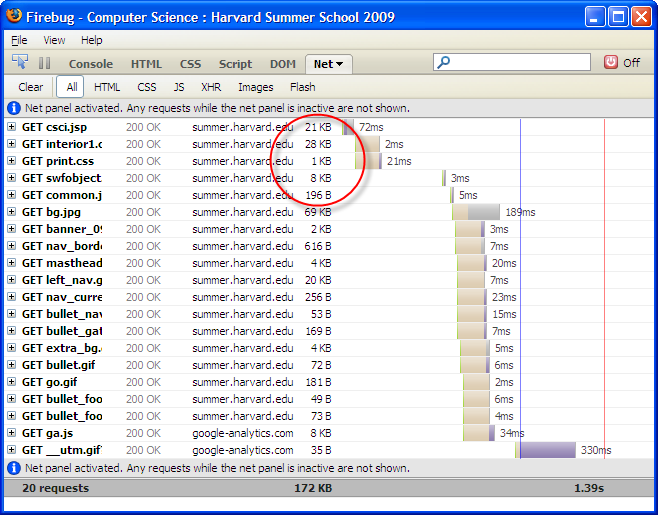
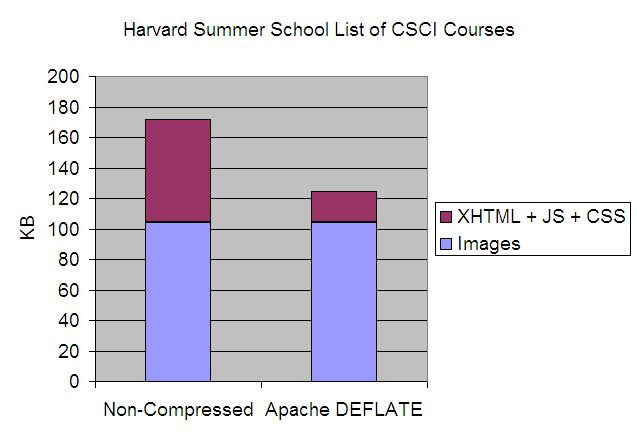
Does Compressing Help?
- 70 to 75% reduction for text files (markup, CSS, non-minified JS)
- 50% reduction for 'minified' JS
Harvard Summer School CSCI Course Listing
- 70% smaller for compressed files
- 27% smaller for total page weight

Friendly Errors
Apache Default "Not Found" 404 document: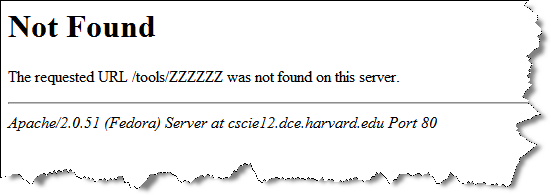
"Not Found" 404 for Whitehouse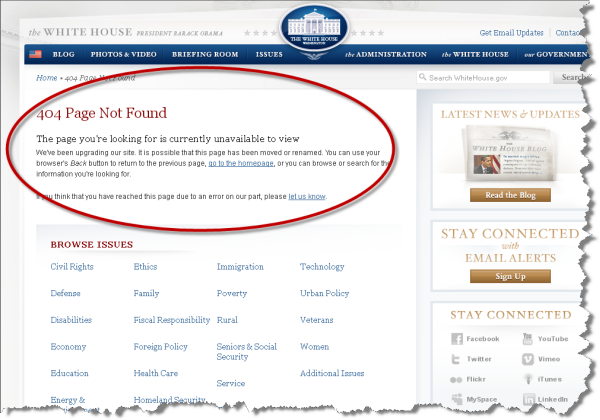
"Not Found" 404 for Whitehouse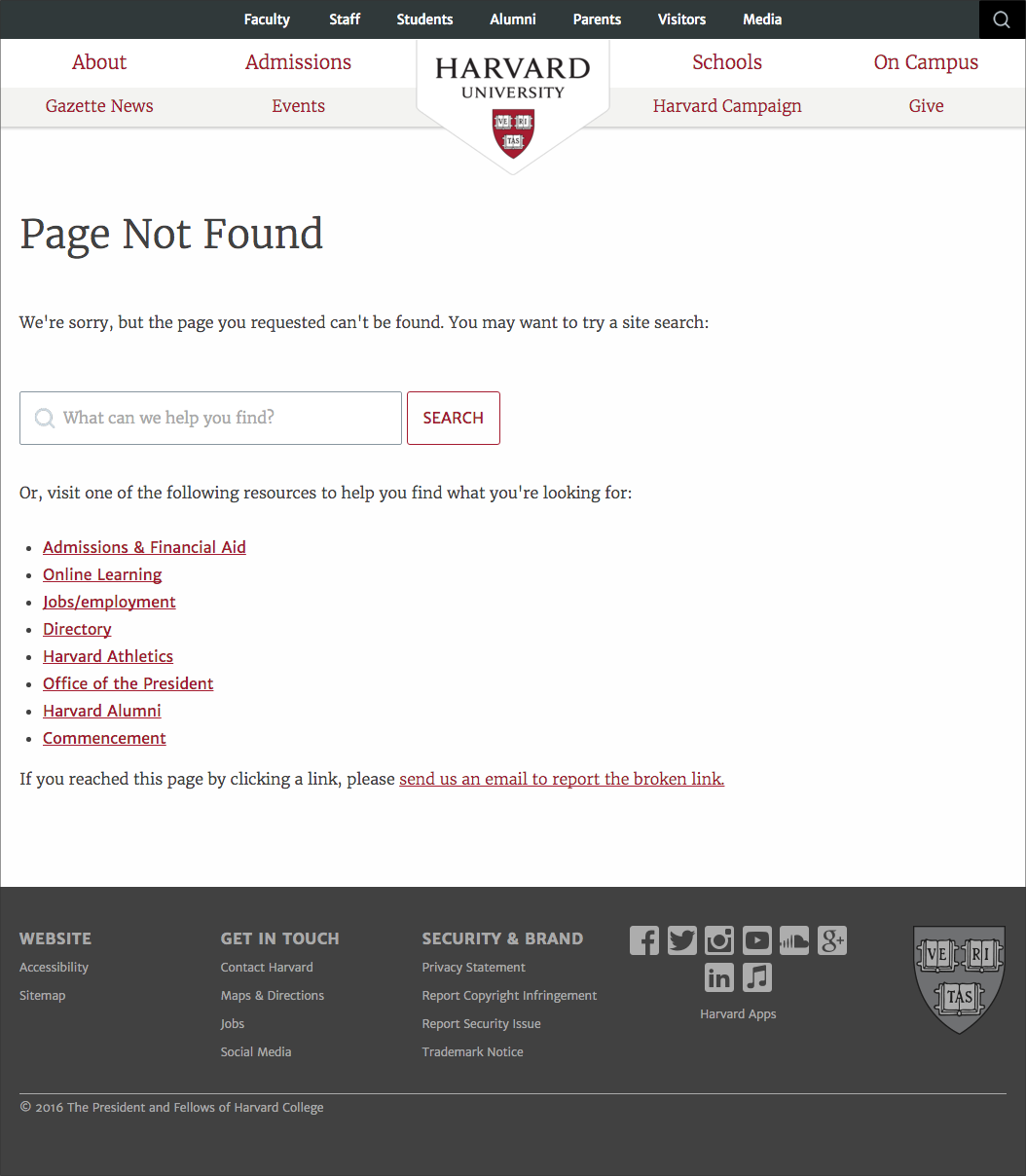
Custom Error Documents
.htaccessErrorDocument 401 /~jharvard/error/status401.html
ErrorDocument 403 /~jharvard/error/status403.html
ErrorDocument 404 /~jharvard/error/status404.html Friendly Ways to Get There
- Short URLs
- Memorable URLs
- Don't break old URLs
HTTP Redirect
- Publish "clean" URLs, and redirect
- Site reorganization changes URL -- redirect old to new
- Redirect
- Rewrite
- Meta http-equiv refresh
- URL shortener services
Redirecting Requests
301 Moved permanently
302 Moved temporarily
Redirecting client requests can be very useful:
- URL moves to a new location
- resource removed
- site structure is reorganized
- Provide "friendly" URLs to advertise, publish, or refer to foot-long URLs.
Redirect
For cscie12.dce.harvard.edu the .htaccess file contains:
Redirect 302 /syllabus https://harvard.instructure.com/courses/1812/assignments/syllabus
Rewrite
mod_rewrite uses regular expressions to match on a pattern and rewrite incoming URLs to a new URL location.
Using mod_rewrite from within .htaccess
If you use RewriteRule from within an .htaccess files, you must
use the RewriteBase directive.
See: http://httpd.apache.org/docs/current/mod/mod_rewrite.html#rewritebase
Example - Make Simple Links Instead of Complex Ones
Context: Parks and Recreation class offered and how to easily link directly to the class
Park and Rec system:https://webtrac.littletonrec.com/wbwsc/webtrac.wsc/wbsearch.html
Link I can use with Rewrite rulehttp://littletontrack.org/lpr-303107
RewriteEngine On
RewriteBase /
RewriteRule ^lpr-(.*)$ https://webtrac.littletonrec.com/wbwsc/webtrac.wsc/wbsearch.html?per=10&xxsearch=yes&xxdispmap=no+&xxmulti-list=&xxmulti-lbls=&xxrowid=&xxmod=ar&xxactivitynumber=$1&xxage=&xxgrade=&xxkeyword=&xxkeywordoption=N&xxtype=&xxcategory=&xxsortoption=ActivityNumber&xxdisplayoption=D&xxsubmit=Search
Example: Create Links that can always point to the correct place
Road Race Registration is done through a 3rd party service, SignMeUp
Redirect  /registration https://www.signmeup.com/site/reg/register.aspx?fid=B42VRH7

Redirect /map http://maps.google.com/maps/ms?ie=UTF8&hl=en&msa=0&msid=101999702593116464805.00046f1a27a9feb5aacaf&ll=42.52946,-71.485934&spn=0.018975,0.018239&z=15
URL Shortener Services
- bitly.com
- and others...
Search Engines and Optimization
- Prepare
- Content: Valid markup (or at least well-formed!), semantic markup,
<title>, meta tags, visual elements have text - Site: robots.txt, sitemap.xml
- Content: Valid markup (or at least well-formed!), semantic markup,
- Submit your site
Content: meta tags
meta tags and Metadata Guidelines (W3 EOWG)
meta elements from Harvard University:
<meta property="twitter:account_id" content="1491443782" />
<meta name="twitter:site" content="@harvard">
<meta name="twitter:creator" content="@harvard">
<meta name="twitter:card" content="summary_large_image">

<meta property="og:site_name" content="Harvard University"/>
<meta property="og:type" content="university"/>
<meta property="og:title" content="Harvard University"/>
<meta property="og:url"
content="https://www.harvard.edu"/>
<meta property="og:description" content="Harvard University is devoted to excellence in
teaching, learning, and research, and to developing leaders
in many disciplines who make a difference globally.
Harvard University is made up of 11 principal academic units."/>
<meta property="og:image"
content="https://www.harvard.edu/sites/default/files/default_images/harvard-social1200.jpg"/>
Search Robots, Crawlers, Spiders
Three mechanisms to instruct robots that visit your site:
- robots.txt file
- robots meta tag
rel="nofollow"foraelements
robots.txt and Examples
- User-Agent
- Disallow
Check out some real robots.txt files!
Robots meta element in markup
<meta name="robots" content="noindex,nofollow" />
- name="robots"
- content
- index or noindex
- follow or nofollow
- noarchive
- none
- all
The Robots meta element can be used on a per document basis.
HTTP Header: X-Robots-Tag
index— index the pagenoindex— don't index the pagefollow— follow links from the pagenosnippet— don't display descriptions or cached linksnofollow— don't follow links from the pagenoarchive— don't cache/archive the pagenone— do nothing, ignore the pageall— do whatever you want, default behavior
Accessibility
The power of the Web is in its universality.
Access by everyone regardless of disability is an essential aspect.
Tim Berners-Lee, W3C Director and inventor of the World Wide Web
Things to know about:
- W3C WAI and WCAG
Accessibility: Getting Started
Oh, The Places You'll Go!

So, in general, I’d encourage you to think about three potential areas, and decide based on your interests which one you pursue next:
- Back-end programming (Python, JS)
- Back-end technologies like Python, Node, or even PHP. Something like CSCI E-7, “Introduction to Programming with Python”
- Front-end programming and design (JS, CSS, design, user experience, CMS)
- Something like DGMD E-20, “Modern and Mobile Front-End Design”.
- More JavaScript
- I think JS deserves its own listing. With it you can do front-end things and work with more complex JS frameworks like Vue or React. You can also work on the back-end with Node. Knowing more JS will always come in handy. Something like CSCI E-3 “Introduction to Web Programming with JavaScript”