Ice Cream Options
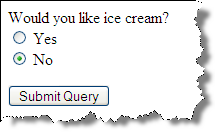
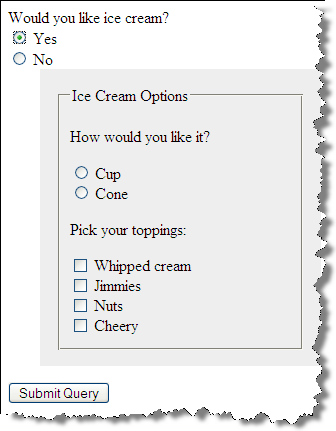
Example
9.1 - Ice Cream Options - Example 9.1
 <h3>Ice Cream </h3>
 <form method="post" name="ice_cream" id="ice_cream" action="https://cs12.net/form/submit.php">
   <div>Would you like ice cream?
     <label>
       <input type="radio" name="want" id="ic_yes" value="yes"/>
Yes     </label>
     <label>
       <input type="radio" name="want" id="ic_no" value="no"/>
No     </label>
   </div>
   <fieldset id="icecream_options">
     <legend>Ice Cream Options     </legend>
     <p>Cup or a Cone?
     </p>
     <label>
       <input type="radio" id="container_cup" name="container" value="cup"/>
Cup     </label>
     <label>
       <input type="radio" id="container_cone" name="container" value="cone"/>
Cone     </label>
     <p>Pick your toppings:
     </p>
     <label>
       <input type="checkbox" name="toppings" id="toppings_wc" value="whipcream"/>
Whipped cream     </label>
     <label>
       <input type="checkbox" name="toppings" id="toppings_jimmies" value="jimmies"/>
Jimmies     </label>
     <label>
       <input type="checkbox" name="toppings" id="toppings_sprinkles" value="sprinkles"/>
Sprinkles     </label>
     <label>
       <input type="checkbox" name="toppings" id="toppings_nuts" value="nuts"/>
Nuts     </label>
     <label>
       <input type="checkbox" name="toppings" id="toppings_cherry" value="cherry"/>
Cherry     </label>   </fieldset>
   <p>
     <input type="submit"/>

   </p>
 </form>
In style
element
(<style>) within head element:
body {font-family: Calibri,Tahoma,Verdana,Helvetica,sans-serif;}
label { display: block;}

input[type=submit] {display: block; margin-top: 1rem;}

#icecream_options {
  display: none;
  background-color: rgb(238, 238, 238);
  margin-left: 1em;
}
In
script element within head element (<script>):
"use strict";

console.log("hello from ice_cream.js");

let inputYes,
    inputNo,
    icoEl;

window.addEventListener('DOMContentLoaded', function(){
    /* here's where JS goes for when DOM is loaded */

    /* add click listener to yes and no */
    inputYes = document.getElementById('ic_yes');
    inputYes.addEventListener('click', function() {
      iceCreamOptionsDisplay();
    } );

    inputNo = document.getElementById('ic_no');
    inputNo.addEventListener('click', function() {
      iceCreamOptionsDisplay();
    });
});


function iceCreamOptionsDisplay() {
    /* function that tests whether 'Yes' or 'No'
       has been selected and sets ice cream option display as needed */
    console.log("in function iceCreamOptionsDisplay");
    icoEl = document.getElementById('icecream_options');
    console.log(icoEl);
    inputYes = document.getElementById('ic_yes');
    if (inputYes.checked == true) {
        icoEl.style.display = 'block';
    } else {
        icoEl.style.display = 'none';
    }
}